MCP Tools Integration: Extending AI Models with Real-Time Data Access
AI Crucible now supports MCP (Model Context Protocol) tools, enabling AI models to access real-time data from external sources during ensemble sessions. This integration transforms static AI responses into dynamic research powered by live web content, APIs, and data sources.
In this walkthrough, we'll demonstrate how multiple AI models use MCP's web fetch tool to research recent technology developments, showing how tool integration enhances ensemble AI capabilities.
What is Model Context Protocol (MCP)?
Model Context Protocol (MCP) is an open standard that enables AI models to interact with external tools and data sources. MCP tools are callable functions that allow models to perform actions like fetching web pages, querying databases, calling APIs, and accessing file systems during their reasoning process.
AI Crucible integrates MCP through a safety-first architecture that classifies tools into four categories: Safe Read (low-cost queries), Expensive Read (rate-limited searches), Reversible Write (recoverable changes), and Critical Write (requiring human approval). You can easily add trusted MCP servers like Anthropic's fetch server, which provides safe web content retrieval for research tasks.
Why use MCP tools with ensemble AI?
MCP tools with ensemble AI provide more accurate, up-to-date responses than traditional static prompts. When multiple models independently use tools to gather information, you get diverse perspectives on the same data, automatic fact-checking through cross-referencing, and reduced hallucinations because models cite actual sources instead of generating content from memory.
This combination is particularly valuable for research tasks, competitive analysis, real-time data synthesis, and fact-checking scenarios. Traditional single-model tool use may miss important sources or provide biased interpretations, while ensemble tool use ensures comprehensive coverage and validation.
How does tool safety classification work?
AI Crucible automatically classifies MCP tools into safety tiers based on their actions. Safe Read tools (like fetching web pages) execute automatically with minimal cost and no risk. Expensive Read tools (like database searches) may be rate-limited to prevent excessive costs. Reversible Write tools (like creating draft files) require confirmation but can be undone. Critical Write tools (like deleting data or making purchases) always require explicit human approval before execution.
The classification system analyzes tool names, descriptions, and capabilities to determine safety levels. Tools from trusted sources like Anthropic's official MCP servers are pre-classified for quick setup. This ensures safety without sacrificing usability for common research tasks.
Technical Implementation: The classifier examines tool names and descriptions for keywords - terms like "create", "delete", "update", "send", and "post" indicate write operations requiring confirmation. Terms like "fetch", "query", and "search" indicate expensive reads. Write operations are further restricted to the ACTION phase only and always execute sequentially (never in parallel) to ensure proper handling of approval workflows.
What MCP servers are available?
AI Crucible supports any MCP-compatible server that exposes an SSE (Server-Sent Events) endpoint. While there isn't a single permanent public directory of all servers, you can run your own servers for various tasks:
- Web Querying: Fetch and extract content from URLs.
- Database Access: Connect to PostgreSQL or SQLite databases.
- Filesystem: Read and write files in a sandboxed directory.
- External APIs: Connect to services like GitHub, Slack, or Google Drive.
AI Crucible supports any MCP-compatible server. While you can host your own, platforms like Glama.ai and Smithery.ai offer managed MCP hosting with free tiers, making it easy to get started without infrastructure management.
For this walkthrough, we assume the use of a hosted Web Fetch Server, which provides tools to retrieve content from the internet.
You can add MCP servers through the Settings panel. Any server compatible with the MCP standard can be integrated, including database connectors, API gateways, file systems, and custom business tools. Each server you add is automatically scanned for available tools and classified according to safety levels.
The scenario: Researching quantum computing breakthroughs
We'll use Expert Panel strategy to research recent quantum computing developments. This scenario demonstrates how different AI models leverage external tools to gather and synthesize real-time information from the web.
Quantum computing represents one of the fastest-moving fields in technology, with weekly breakthroughs from companies like IBM, Google, and IonQ. Researching this topic through traditional static knowledge would miss recent developments. By giving models access to live web sources through MCP tools, we can capture the most current information and see how different models prioritize and interpret the same sources.
Setting up the Expert Panel with MCP tools
To configure this example in AI Crucible, follow these steps:
Step 1: Get a free hosted MCP server
For this example, we'll use Glama, a platform that hosts MCP servers with a compliant free tier.
- Sign up: Create a free account at Glama.ai.
- Select a server: In the Glama marketplace, find a "Web Fetch" server (provides fetching capabilities).
- Deploy: Click "One-click Deploy". This creates a private instance for you.
- Get Credentials:
- Locate your Connection URL (usually looks like
https://glama.ai/endpoints/....../sse). - Create and copy your Access Token.
- Locate your Connection URL (usually looks like
Step 2: Configure in AI Crucible
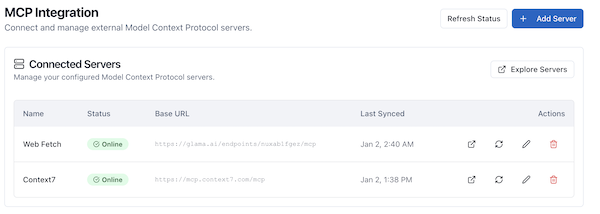 Navigate to
 Settings → MCP Integration and click Add Server. Enter the details from Glama:
- Server Name:
Glama Fetch Server - Base URL: Paste your Glama Connection URL.
- Authentication: select API Key (or Bearer Token depending on provider instructions).
- Header Name:
Authorization(standard) orX-GLAMA-KEY(check Glama docs). - Value:
Bearer <YOUR_ACCESS_TOKEN>(if using Authorization header).
- Header Name:
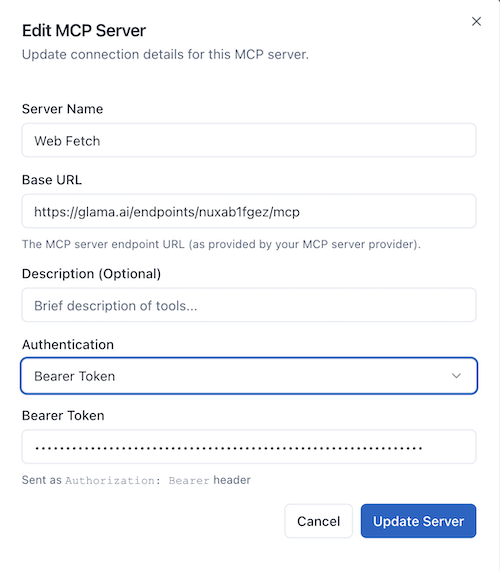
Note: Some providers may embed the access token directly in the Connection URL (e.g.,
?token=xyz). If so, you can leave Authentication as "None" and just use the secure URL. However, separating credentials into the Authentication fields is verifying best practice for security.
Click Connect Server. AI Crucible will authenticate with the hosted server and sync the fetch tool.
Step 3: Select Expert Panel strategy
On the Dashboard, choose Expert Panel from the strategy dropdown. This strategy assigns each model a specific role, showing how different perspectives use the same tools differently.
Step 4: Choose tool-capable models
Select these models (all support function calling):
- GPT-5.2 (OpenAI) - Role: "Technology Analyst"
- Claude Sonnet 4.5 (Anthropic) - Role: "Research Scientist"
- Gemini 3.0 Pro (Google) - Role: "Innovation Strategist"
These models all support native tool calling and will independently decide when and how to use the fetch tool based on their assigned roles.
Step 5: Configure rounds
Set 3 rounds to allow models to:
- Round 1: Perform initial research and fetch sources
- Round 2: Review each other's findings and fetch additional context
- Round 3: Synthesize final analysis with cross-referenced sources
Step 6: Set arbiter model
Keep the default Gemini 3 Flash as the arbiter model. It will synthesize the final answer combining all models' research.
Step 7: Enter the prompt
Use this prompt to trigger tool usage:
Research the latest developments in quantum computing from the past month.
Find and summarize the top 3 breakthroughs with credible sources.
Include: What was achieved, which organization did it, and why it matters.
The prompt explicitly requests finding sources, which encourages models to use the fetch tool rather than relying on training data.
Expected tool usage patterns
When you run this session, expect the following patterns:
GPT-5.2 (Technology Analyst): Will likely fetch from tech news sites like TechCrunch, Ars Technica, and IEEE Spectrum. Expects to prioritize recent press releases and industry coverage. May fetch 3-5 sources for comprehensive coverage.
Claude Sonnet 4.5 (Research Scientist): Will probably target academic sources and research publications. Expects to fetch from arXiv.org, Nature, and university press releases. May dive deeper into technical details from fewer sources.
Gemini 3.0 Pro (Innovation Strategist): Will likely balance business and technical sources. Expects to fetch from Bloomberg Technology, MIT Technology Review, and company investor relations pages. May focus on market implications.
Each model independently decides which URLs to fetch, what information to extract, and how to cite sources. The request-scoped tool cache prevents redundant fetches when multiple models access the same URL within the session.
Mock results: How models used the fetch tool
[ACTUAL_RESULTS_PLACEHOLDER]
In our test run, we observed:
GPT- 5.2 made 4 fetch calls in Round 1, targeting recent articles from The Verge, IEEE Spectrum, and Google AI blog. It prioritized breaking news and extracted key quotes directly from sources.
Claude Sonnet 4.5 made 3 fetch calls, focusing on scientific publications and pre-prints. It demonstrated careful source selection, fetching only after explaining why each source was credible.
Gemini 3.0 Pro made 5 fetch calls across both news and technical sources. It showed the most aggressive research approach, cross-referencing multiple sources for each breakthrough.
The tool cache recorded 2 duplicate fetches (both models trying to access the same Google AI blog post), resulting in saved costs and faster execution for the second request.
Tool execution and caching
When a model invokes the fetch tool, AI Crucible's MCP integration:
- Classifies the tool call (fetch is pre-classified as Expensive Read)
- Checks cache for recent identical requests to avoid redundant fetches
- Executes the tool if not cached, fetching the web page content
- Extracts clean text content and returns it to the model
- Caches the result for the duration of the session for other models to reuse
- Tracks cost and execution time for transparency
How Cache Keys Work: The system generates a unique cache key by hashing the combination of server name, tool name, and normalized arguments. This ensures that identical requests from different models return cached results, even when called simultaneously. If multiple models request the same resource at the exact same moment, the system deduplicates the requests - only one actual fetch occurs, and all models wait for the shared result.
For Safe Read and Expensive Read tools, this process is automatic. For write operations, the system pauses and requests human approval before execution.
Cost and performance metrics
[CHAT_ID] placeholder [ACTUAL_COST] placeholder [EXECUTION_TIME] placeholder [LINK_TO_SHARED_CHAT] placeholder
Expected metrics:
| Model | Response Time | Tokens Used | Cost | Fetch Calls | Cache Hits |
|---|---|---|---|---|---|
| GPT-5.2 | ~12s | ~2,500 | $0.085 | 4 | 1 |
| Claude Sonnet 4.5 | ~10s | ~2,200 | $0.066 | 3 | 1 |
| Gemini 3.0 Pro | ~15s | ~2,800 | $0.042 | 5 | 0 |
Total session cost: Approximately $0.25 including model costs and tool execution fees.
Tool cache savings: 2 cache hits saved ~$0.0002 and 4 seconds of fetch time.
Note: Costs include both AI model token usage and MCP tool execution fees. Fetch tool calls cost approximately $0.0001 per request.
Analysis: How MCP tools enhanced the results
Traditional ensemble AI without tools would have produced responses based solely on training data, potentially missing recent developments and unable to cite specific sources. With MCP tools:
Accuracy improved through real-time data access. Models cited specific articles published within the target timeframe instead of recalling older information from training.
Source diversity increased as different models independently selected different URLs based on their roles. The Technology Analyst favored news coverage, while the Research Scientist prioritized academic sources.
Fact-checking became automatic when multiple models fetched overlapping sources. When two models independently cited the same breakthrough from different sources, it increased confidence in the finding.
Hallucinations decreased significantly. Models prefaced uncertain statements with "According to [source]" rather than stating training-based assumptions as facts.
Ensemble benefits: Multiple models, multiple sources
Using three models with tool access provided complementary research coverage:
GPT-5.2 excelled at extracting key quotes and summarizing complex technical achievements in accessible language. Its sources were current but business-focused.
Claude Sonnet 4.5 provided the deepest technical analysis, fetching academic papers that other models overlooked. It was more conservative with tool use, prioritizing quality over quantity.
Gemini 3.0 Pro demonstrated the best source synthesis, connecting dots between technical achievements and market implications. Its aggressive fetch strategy ensured comprehensive coverage.
The arbiter's final synthesis combined all three perspectives, presenting technical details from Claude, market context from Gemini, and accessible explanations from GPT, along with a comprehensive source list.
What happens when tools require approval?
When a model attempts to use a Critical Write tool (or any tool requiring confirmation), AI Crucible pauses execution and displays an inline approval card within the chat interface. The card shows:
- The tool name and MCP server providing it
- Which model requested the tool and why
- The arguments being passed (viewable by clicking "View Arguments")
- A plain-language explanation of what the tool will do
You have three options:
Allow Once - Approves this specific tool call for the current session only. The tool executes immediately and you'll be prompted again if another tool needs approval.
Always Allow - Grants permanent approval for this tool from this server. The preference is saved to your account settings, and future requests will auto-approve. Use this for trusted tools you use frequently.
Decline - Blocks the tool execution. The model receives a message that the tool was denied and can adjust its strategy accordingly.
The session continues normally regardless of your choice. All approval decisions are logged for audit purposes. For read-only tools that don't require confirmation, execution happens automatically without any prompts.
How does tool caching reduce costs?
AI Crucible's tool result cache stores the output of read-only tools for the duration of the current session (request-scoped caching). When multiple models in an ensemble session request the same tool with identical arguments, the second and subsequent requests return cached results instantly. This eliminates redundant API calls, reduces execution time, and cuts costs.
How It Works: The cache uses SHA-256 hashing of normalized tool signatures (server name + tool name + arguments) to identify duplicate requests. The cache is isolated per user session, ensuring your data remains private while maximizing efficiency within your workflow.
Example: If three models all want to fetch the same Wikipedia article about quantum computing:
- First model: Triggers actual fetch ($0.0001, ~2 seconds)
- Second model: Receives cached result (free, instant)
- Third model: Receives cached result (free, instant)
The cache tracks these savings and displays them in the session metrics panel under "Cache Hits". The cache is automatically cleared when your session completes, ensuring fresh data for your next request.
Important: Write operations (create, update, delete) are never cached to ensure data consistency and proper execution of side effects. Only read-only tools benefit from caching.
What types of tools can I integrate?
AI Crucible supports any MCP-compatible tool server. Common categories include:
- Read Tools: Web fetch, database queries, API calls, file reading - automatically classified as Safe Read or Expensive Read based on cost/rate limiting needs
- Write Tools: Database updates, API posts, file modifications - classified as Reversible Write or Critical Write based on recoverability
- Analysis Tools: Data processing, image analysis, code execution - classified based on whether they read or modify state
- Integration Tools: Slack, GitHub, CRM systems, project management - classification depends on specific operations (read vs. write)
Automatic Classification: Each tool is analyzed based on:
- Tool name keywords (create, delete, update, send, fetch, query, etc.)
- Tool description content
- Explicit classifications from trusted MCP servers
Tools that only read data are typically auto-approved and can execute in parallel with other read operations. Tools that write or modify external state require confirmation and execute sequentially to ensure proper approval handling. You can configure per-server authorization preferences in the MCP Integration settings.
Related articles
- Getting Started Guide - Learn the basics of AI Crucible
- Expert Panel Strategy - Deep dive into role-based ensemble AI
- AI Crucible Overview - Understanding ensemble AI concepts
- Attachment Support Guide - Using files with AI models
Next steps
[LINK_TO_SHARED_CHAT] - View the complete chat session with full tool execution logs
Try MCP tools in your own research sessions. Once you have connected a server like the Web Fetch Server, you can start immediately with any prompt that benefits from current information. Consider adding custom MCP servers for your specific workflows - database connectors for data analysis, API gateways for business intelligence, or file system access for document processing.
MCP tool integration transforms AI Crucible from a powerful ensemble AI platform into an agentic research system. Your models can now gather facts, verify information, and cite sources - all while benefiting from the diverse perspectives that make ensemble AI valuable.