Getting Started with AI Crucible
This guide covers the five steps of running your first ensemble AI session — from picking a strategy to reviewing results. No prior experience needed.
Quick Start: If you want to jump right in, you can select one of our 50+ professionally crafted suggested prompts displayed at the bottom of the prompt input. These cover common business, technical, and creative scenarios. Just click any prompt to get started!
By the end of this guide, you'll know:
- How to choose a strategy
- How to select AI models
- How to configure rounds
- How to write effective prompts
- How to review, share, and use your results
Time to read: 5-10 minutes Typical cost: $0.10-0.25 per session Speed: 3-5 minutes per run
Want detailed examples? After completing this guide, check out:
- Competitive Refinement Example - Email campaign walkthrough
- Expert Panel Example - Business decision analysis
Let's get started!
Understanding the Basics
Before we start, here's what makes AI Crucible different: instead of asking one AI model for an answer, you'll orchestrate 3-4 models working together through a structured strategy. Think of it as assembling a team of experts rather than consulting just one advisor.
The four key decisions you'll make:
- What problem are you solving? (Your prompt - or choose from suggested prompts)
- Which strategy fits your goal? (How the models will collaborate)
- Which AI models should participate? (Your team of experts)
- How many refinement rounds? (How much iteration you need)
Pro Tip: Not sure what to ask? The suggested prompts at the bottom of the input field provide excellent starting points for business strategy, technical analysis, creative writing, and more. They show best-practice prompt structure you can learn from.
Your First AI Crucible Session: 5 Simple Steps
Let's walk through the basics. We'll keep it simple so you can get started quickly.
Step 1: Choose Your Strategy
Start with Competitive Refinement - it works great for most tasks!
What it does:
- Models create their own versions independently
- They review each other's work and improve
- You get multiple high-quality options to choose from
Perfect for:
- Writing (emails, blog posts, social media)
- Marketing content
- Creative brainstorming
- Any task where you want multiple perspectives
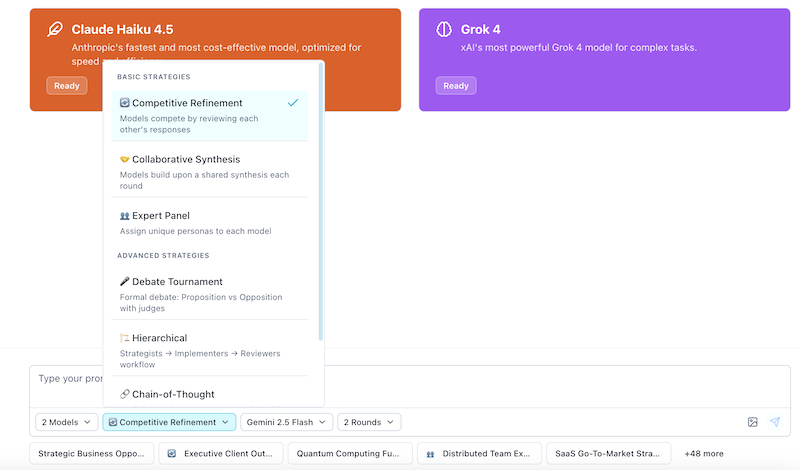
Quick Strategy Picker:
- Writing/creative? → Competitive Refinement
- Analysis/research? → Collaborative Synthesis
- Need expert opinions? → Expert Panel
- Testing an idea? → Debate Tournament
- Step-by-step reasoning? → Chain-of-Thought
- Security/stress-testing? → Red Team / Blue Team
Want to dive deeper? Check out our Competitive Refinement guide or Expert Panel walkthrough for complete examples.
Step 2: Select Your AI Models
AI Crucible offers 34+ models across 10 providers. Here are recommended combos to get started:
Budget-friendly (~$0.05-0.15):
- GPT-5 Nano (ultra-cheap, surprisingly capable)
- Gemini 3 Flash (fast, affordable)
- Claude Haiku 4.5 (cost-effective)
Balanced — recommended (~$0.15-0.25):
- GPT-5 Mini (creative, engaging)
- Claude Sonnet 4.5 (thoughtful, nuanced)
- Gemini 3 Pro (powerful, multi-perspective)
Premium (~$0.40-0.80):
- GPT-5.2 (latest flagship reasoning)
- Claude Opus 4.6 (highest Anthropic quality)
- Gemini 3 Pro (comprehensive analysis)
Browse all 34+ models: See the full list with specs, pricing, and provider details on the Model Specs page.
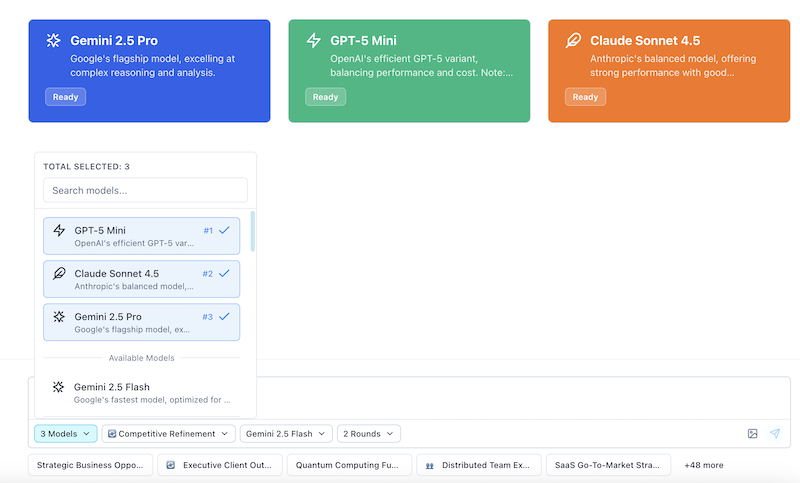
Pro tip: Start with the balanced combo. You can always adjust based on your needs and budget.
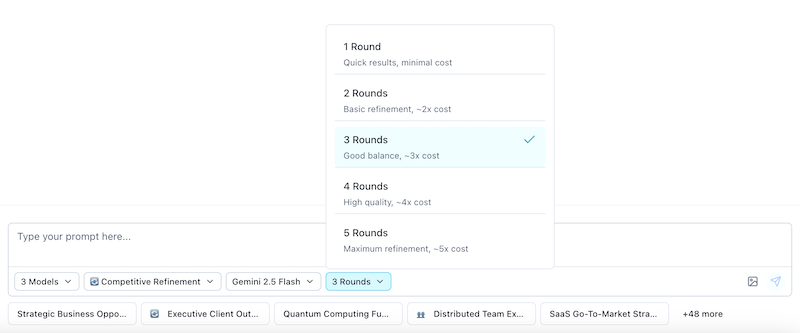
Step 3: Set the Number of Rounds
Start with 3 rounds - works for most tasks!
What happens in each round:
- Round 1: Models create independently
- Round 2: Models review each other and improve
- Round 3: Models produce their best work
Quick guide:
- Quick tasks: 2 rounds
- Most tasks: 3 rounds (recommended)
- Complex tasks: 3-4 rounds
Pro tip: Enable "Adaptive Iteration Count" in Settings → Optimizations (/user/optimizations) to automatically stop when models reach consensus, saving you money!
Step 4: Write Your Prompt
Quick Start Option: Use a Suggested Prompt
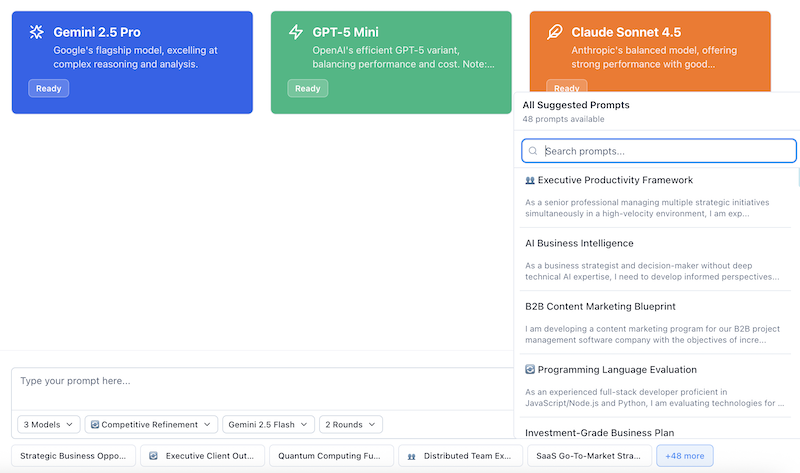
New to AI Crucible? You don't have to start from scratch. At the bottom of the prompt input area, you'll find professionally crafted sample prompts covering common use cases:
- Strategic business opportunities
- Executive client outreach
- Technical evaluations
- Marketing strategies
- Product development
- API design and architecture
- Data privacy compliance
- Security assessments
- Code refactoring strategies
- And 40+ more professional scenarios
How to use suggested prompts:
- Browse visible prompts: The interface shows 2-5 prompts directly (depending on your screen size), displaying each with an optional strategy emoji that indicates which ensemble strategy works best for that prompt type
- Access more prompts: Click the "+XX" button to open a searchable dropdown containing all 50+ available prompts
- Search and filter: If the dropdown has more than 5 prompts, you'll see a search input to quickly find prompts by keyword (e.g., "security", "marketing", "code")
- Select a prompt: Click any prompt to automatically populate the input field—the selected prompt's recommended strategy (if available) will also be applied
- Customize: Modify the prompt for your specific needs or use it as-is
- Run: Click "Send" to start your ensemble process
These prompts are designed to demonstrate best practices: clear context, specific requirements, and structured deliverables. They're excellent examples to learn from, even if you modify them significantly. Many prompts include a recommended strategy (indicated by an emoji) to help you get started quickly.
Writing Your Own Prompt
What makes a good prompt?
- Be specific — include context, audience, and goals
- Set constraints — word count, tone, format
- Define deliverables — what exactly do you want?
- Provide examples — show what good looks like (optional)
Example prompt structure:
[What you want created]

CONTEXT:
- [Background information]
- [Target audience]
- [Current situation]

REQUIREMENTS:
- [Specific requirement 1]
- [Specific requirement 2]
- [Specific requirement 3]

DELIVERABLES:
1. [Deliverable 1]
2. [Deliverable 2]
3. [Deliverable 3]

TONE: [Professional/Casual/Technical/etc.]
LENGTH: [Word count or length guidance]
Pro tip: The more specific you are, the better the results. Don't be afraid to add details!
Want to see a complete example? Check out the Competitive Refinement guide for a full walkthrough with a product launch email campaign.
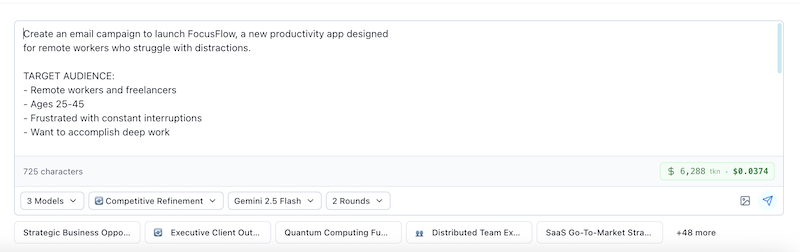
Step 5: Review and Run
Before clicking "Run," you'll see:
Configuration summary:
- Strategy selected
- Models chosen
- Number of rounds
- Estimated cost
- Estimated time
Typical costs:
- Budget setup (3 models, 3 rounds): Approx. $0.10-0.15
- Balanced setup (3 models, 3 rounds): Approx. $0.15-0.25
- Premium setup (3 models, 3 rounds): Approx. $0.40-0.60
Typical time: 3-5 minutes
What's the Arbiter Model?
The arbiter is like a "judge" that:
- Analyzes all responses
- Generates comparative analysis
- Synthesizes the best elements
- Usually Gemini 3 Flash or Gemini 2.5 Flash (cost-effective)
Pro tip: You can change the arbiter model in Chat Defaults (/user/chat-defaults) for higher-quality analysis.
Need Help Configuring? Use the AI Assistant
Not sure which strategy, models, or rounds to pick? Open the AI Prompt Assistant (click the AI Assistant button or press Cmd+A / Ctrl+A). It analyzes your prompt in real-time, classifies it into one of 14 categories, and recommends the optimal strategy, models, round count, and arbiter — all with one-click apply. Learn more in the AI Prompt Assistant Guide.
Ready? Click "Run" and watch the magic happen!
What Happens When You Click "Run"
You'll see models working in real-time!
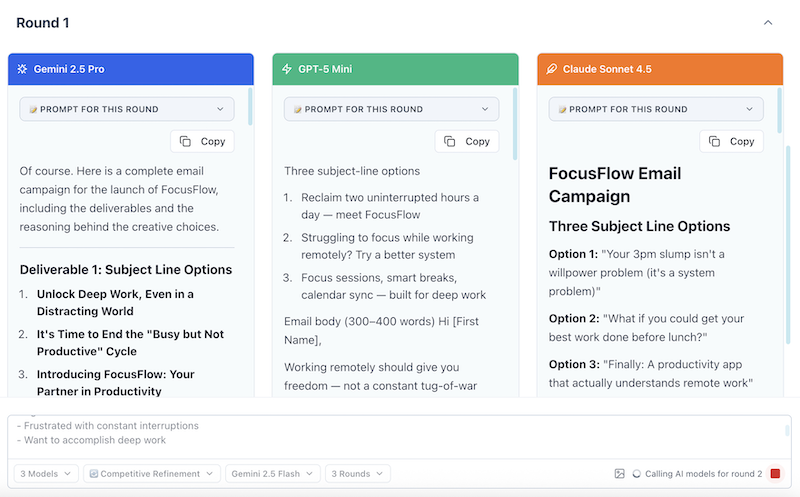
Round 1: Independent Creation (0-60 seconds)
What you see:
- Three cards appear, one for each model
- Each model generates its response independently
- Responses stream in real-time
What's happening:
- Each model receives your prompt
- No model sees what others are writing
- You get genuinely different perspectives
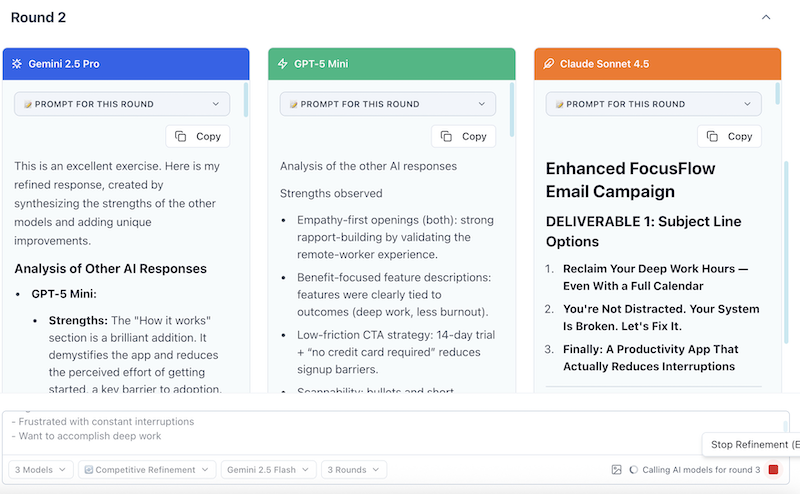
Round 2: Learning & Improvement (60-120 seconds)
What you see:
- Models review each other's Round 1 responses
- They identify strengths and weaknesses
- They improve their own work
What's happening:
- Models learn from each other
- Quality improves noticeably
- Innovation gets cross-pollinated
Round 3: Final Polish (120-180 seconds)
What you see:
- Models produce their best versions
- Responses are more refined and polished
- Often you'll see convergence on the best approach
What's happening:
- Models incorporate all feedback
- Final polishing and refinement
- High-quality, ready-to-use content emerges
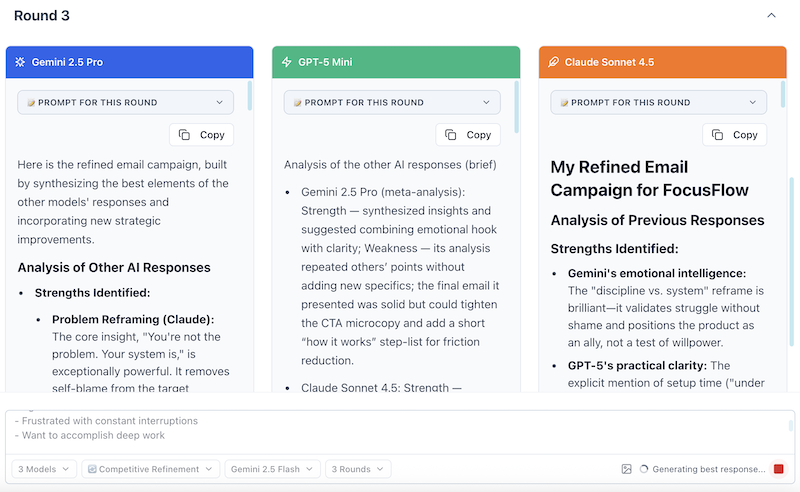
Pro tip: You can expand each round to see the full responses as they're generated!
Understanding Your Results
After execution completes, you'll see:
1. Conversation History
All rounds organized and easy to review:
🔵 Round 1 - Initial diverse responses
- Click to expand and see each model's first attempt
- Notice the different approaches and styles
🟡 Round 2 - Improved versions
- See how models learned from each other
- Quality improves noticeably
🟢 Round 3 - Final polished versions
- Best work from each model
- Often converges on proven patterns
2. Final Results & Insights
Scroll down to see the synthesized results:
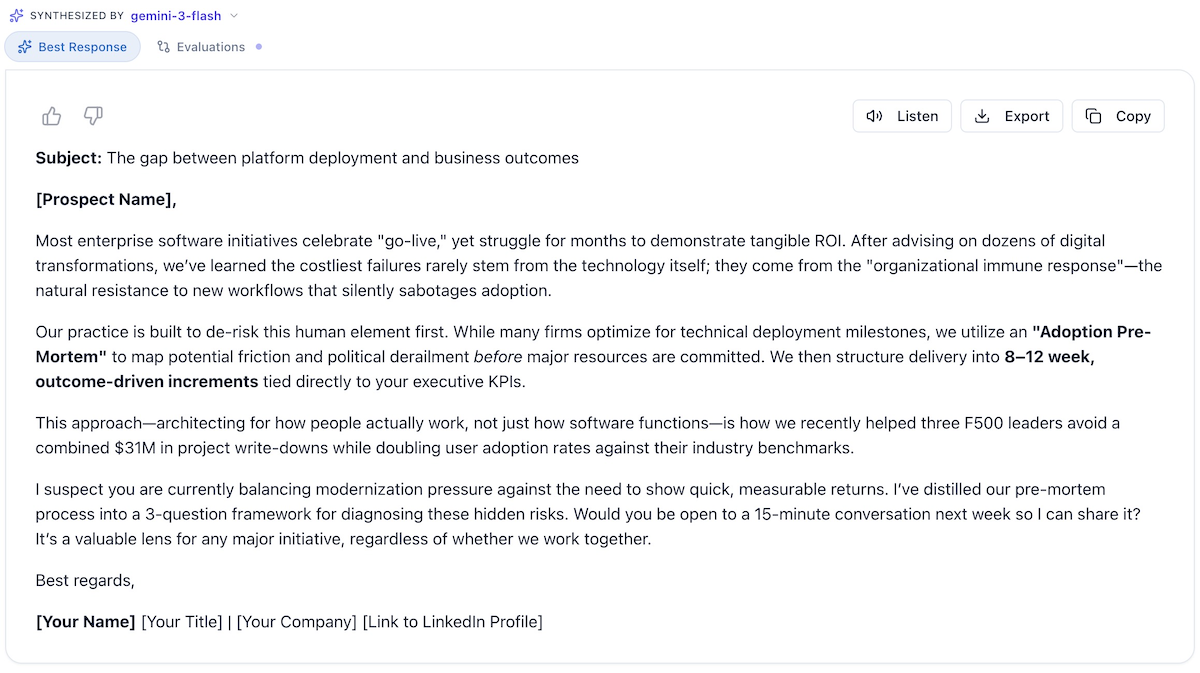
Best Response Tab
- The top-rated response (or merged best elements)
- Ready to copy and use
- Shows which model(s) contributed
Evaluations Tab (click to load)
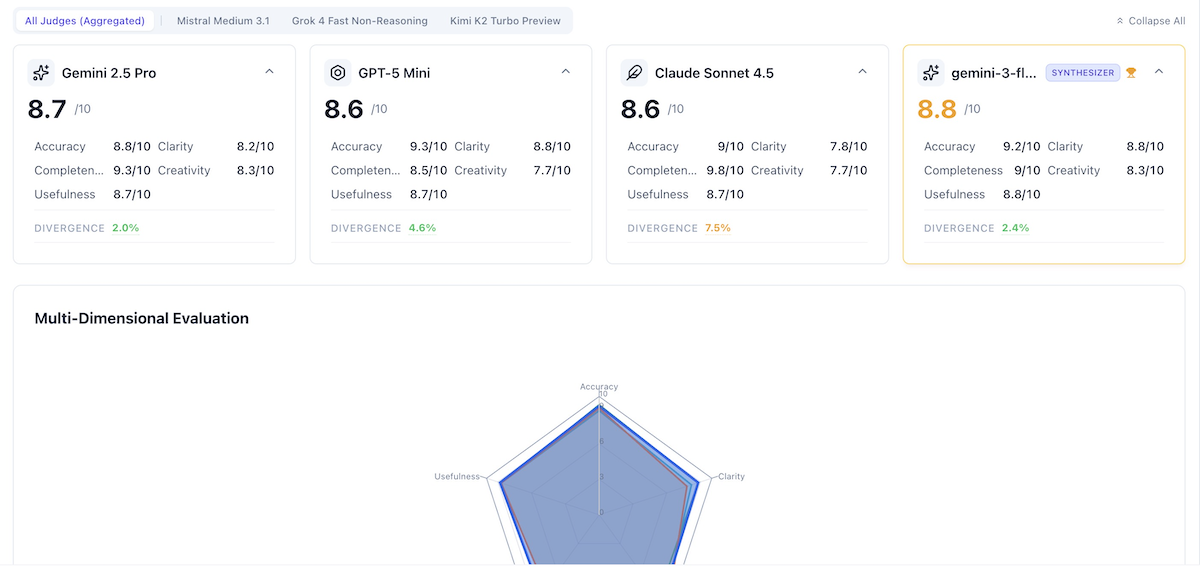
- Review detailed scoring and tagging data
- Determine which model(s) are the best
- Compares the indiviual models responses to the synthesized final response
3. Share Your Results
Want to share your comparison with colleagues? Click the Share button to:
- Generate a public link — anyone with the link can view the read-only results
- Copy an embed code — paste an iframe into your blog, docs, or internal wiki
- Choose a view mode — share just the best response or the full comparison
You can revoke sharing at any time from the same dialog.
Cost and Time Breakdown: The Final Tally
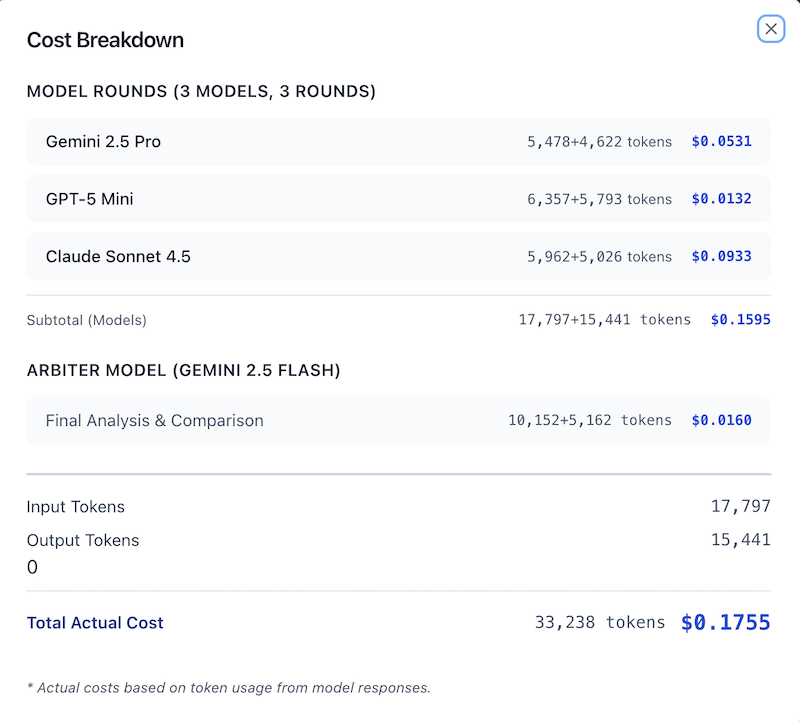
Actual Results for This Session
Total Cost: ~$0.10 (plus ~$0.02 for arbiter analysis = ~$0.12 total)
Model Costs (3 models × 3 rounds):
- Gemini 2.5 Pro: $0.0400 (20,019 tokens)
- GPT-5 Mini: $0.0112 (5,582 tokens) — Most cost-effective!
- Claude Sonnet 4.5: $0.0484 (24,194 tokens)
- Subtotal (Models): $0.0996
Arbiter Model (Gemini 3 Flash):
- Comparison & Arbitration: $0.0183 (9,160 tokens)
Total Actual Cost: $0.1179 (~$0.10 models + ~$0.02 arbiter)
Total Time: Approximately 3-4 minutes
- Round 1: ~60-80 seconds (parallel execution)
- Round 2: ~70-90 seconds (parallel execution with longer context)
- Round 3: ~60-80 seconds (final refinement)
Key Insights:
- GPT-5 Mini provided excellent value at only $0.0112 for all 3 rounds
- Claude Sonnet 4.5 processed the most tokens (24,194) at $0.0484
- Total tokens processed: 58,955 tokens across all models and arbiter
- Cost per model per round: $0.004-$0.016 depending on model and context length
What We Accomplished
From a single prompt and ~$0.12 total (~$0.10 for models + ~$0.02 for arbiter synthesis), you received:
- 9 distinct subject line options (3 per model in Round 1)
- 3 refined subject line sets in Round 2 (after competitive improvement)
- 3 final polished versions in Round 3 (convergence and excellence)
- Cross-model critique and learning (visible improvement across all 3 rounds)
- Final synthesized recommendations combining best elements
- Evaluation scores showing Claude Sonnet 4.5 as winner (9.5/10)
- Similarity analysis showing strong diversity (70% unique content per model)
- Multiple export formats for team collaboration
Compare to traditional approaches:
| Approach | Time | Cost | Quality | Diversity |
|---|---|---|---|---|
| Single ChatGPT prompt | 30 sec | $0.03 | Medium | Low (one perspective) |
| Manual iteration (3 prompts) | 5 min | $0.09 | Medium-High | Medium (your prompt variations) |
| Hiring copywriter | 2-5 days | $200-$500 | High | Low (one writer's style) |
| AI Crucible Ensemble | 3-4 min | $0.16-0.18 | High | High (3 expert perspectives) |
Key Takeaways and Best Practices
What Made This Successful
- Clear, specific prompt with context, requirements, and constraints
- Right strategy choice (Competitive Refinement for creative iteration)
- Diverse model selection (different strengths from different providers)
- Appropriate round count (3 rounds for creative task)
- Convergence detection (saved money without sacrificing quality)
Quick Start Scenarios
| Scenario | Strategy | Models | Rounds |
|---|---|---|---|
| Blog Post / Creative Writing | Competitive Refinement | GPT-5 Mini, Claude Sonnet 4.5, Gemini 3 Pro | 3 |
| Business Decision Analysis | Collaborative Synthesis or Expert Panel | Claude Sonnet 4.5, GPT-5.2, Gemini 3 Pro | 2-3 |
| Social Media Content | Competitive Refinement | GPT-5 Nano, Gemini 3 Flash, Claude Haiku 4.5 | 2-3 |
| Code Review | Expert Panel | Claude Opus 4.6, GPT-5.2, DeepSeek Reasoner | 2 |
| Red Team / Stress Test | Red Team / Blue Team | Grok 4, Claude Sonnet 4.5, GPT-5 Mini | 2-3 |
| Project Planning | Hierarchical or Expert Panel | Claude Sonnet 4.5, GPT-5.2, Gemini 3 Pro | 2-3 |
Explore More Features
AI Crucible has grown well beyond core ensemble chat. Here are the key features to explore:
Search & History
Use the Search page (/search) to find past conversations by prompt text, strategy, or model. Filter by strategy type to quickly locate previous work.
Benchmarks
Visit the Benchmarks page (/benchmarks) to see how different strategies and model combinations score across categories like creative, business, technical, and research prompts. Use this data to pick the best setup for your task.
Evaluations Dashboard (Pro)
In Settings → Evaluations (/user/evaluations), review detailed scoring and tagging data across your sessions. Tag evaluations for easy retrieval and track model performance over time.
Web Grounding (Pro)
Toggle Web Grounding in the tools menu on the chat bar to let your models search the web for current information during ensemble runs. Useful for news analysis, market research, and any prompt requiring up-to-date data.
MCP Integration (Pro)
Connect external Model Context Protocol servers in Settings → MCP (/user/mcp) to give your models access to external tools and data sources during ensemble runs. Add, configure, and manage MCP servers from a single page.
Custom Models (Pro)
In Settings → Custom Models (/user/custom-models), connect any OpenAI-compatible API—self-hosted models, Ollama, OpenRouter, etc.—and use them alongside built-in models in your ensemble runs.
Expert Personas
In Settings → Expert Personas (/user/experts), create and manage reusable expert personas for the Expert Panel strategy. Assign a default model and custom description to each persona so you can quickly assemble specialized panels.
Your AI Crucible Journey
Congratulations! You've completed your first ensemble AI project. Here's what to do next:
1. Try Your Own Project (Right Now!)
Pick something you actually need:
- A blog post you've been putting off
- An email you need to write
- A business decision you're considering
- Social media content for next week
Use one of our Quick Start Scenarios above and customize it for your needs.
The best way to learn is by doing!
2. Explore Different Strategies
Try these next:
- Expert Panel - Get specialized expert opinions on a complex problem
- Competitive Refinement - Deep dive into the strategy you just used
- Seven Strategies Overview - See all available strategies
When to try each:
- Need expert analysis? → Expert Panel
- Testing an idea? → Debate Tournament
- Planning something complex? → Hierarchical
3. Customize Your Settings
Make AI Crucible work your way:
Go to Settings (⌘/Ctrl+,) to access multiple configuration pages:
| Page | Path | What You Can Do |
|---|---|---|
| Chat Defaults | /user/chat-defaults |
Default models, arbiter model |
| Optimizations | /user/optimizations |
Streaming, Adaptive Iteration, Semantic Caching, Context Compression, Smart Model Selection |
| Cost Controls | /user/cost |
Budget limits, token limits |
| Usage | /user/usage |
Spending stats, optimization savings |
| Expert Personas | /user/experts |
Create/manage reusable expert personas |
| MCP (Pro) | /user/mcp |
Connect external MCP tool servers |
| Custom Models (Pro) | /user/custom-models |
Add OpenAI-compatible endpoints |
| API Keys | /user/api-keys |
Manage your provider API keys |
| Evaluations (Pro) | /user/evaluations |
Review scores and tags across sessions |
| Public Chats | /user/public |
Manage your shared/public chats |
New in Optimizations:
- Smart Context Compression — AI-powered summarization of long conversation history to stay within model context limits while preserving meaning
- Smart Model Selection — Automatically matches model tier to prompt complexity (potential 30-40% cost savings)
4. Use Suggested Prompts & the AI Assistant
Don't start from scratch:
- Browse 50+ professionally crafted prompts at the bottom of every chat input
- Click any prompt to auto-populate the input and customize for your needs
- Open the AI Prompt Assistant (
Cmd+A/Ctrl+A) for real-time prompt analysis, smart strategy/model recommendations, and one-click configuration — learn more
Frequently Asked Questions
How do I choose the right strategy?
Start with Competitive Refinement for creative tasks (writing, marketing, brainstorming). Use Expert Panel for specialized perspectives on complex decisions. Use Debate Tournament to stress-test ideas. Try Chain-of-Thought for step-by-step reasoning and Red Team / Blue Team for adversarial security testing. See the Seven Strategies Guide for detailed comparisons.
How many models / rounds do I need?
3 models and 3 rounds is the sweet spot for most tasks ($0.15-0.25, 3-4 minutes). Use 2 rounds for simple tasks, 4+ models for complex analysis or debates. Enable Adaptive Iteration Count in Optimizations to let AI Crucible stop early when responses converge.
Why are my results generic?
Your prompt likely needs more specificity. Instead of "Write a blog post about productivity," try: "Write an 800-word blog post for remote workers about productivity, focusing on time-blocking techniques. Tone: practical and encouraging." Include context, audience, constraints, and deliverables.
How can I reduce costs?
- Use 2-3 models instead of 4-5
- Enable Adaptive Iteration Count and Semantic Caching
- Enable Smart Model Selection to auto-match model tier to complexity
- Use budget-friendly models: GPT-5 Nano, Gemini 3 Flash, Gemini 2.5 Flash, DeepSeek Chat
- Set word count limits in your prompt
Can I use my own models?
Yes! Pro users can add Custom Models via any OpenAI-compatible endpoint in Settings → Custom Models (/user/custom-models). This lets you connect self-hosted models, fine-tuned variants, or any provider that exposes an OpenAI-compatible API.
Can I share my results?
Yes! Click the Share button on any completed chat to generate a public read-only link or embed code. Manage all your shared chats in Settings → Public Chats.
What's the difference between ensemble AI and ChatGPT?
ChatGPT gives you one model's perspective. AI Crucible coordinates multiple models through structured strategies—giving you more diverse, balanced, and higher-quality results by combining different models' strengths and having them learn from each other.
Is my data private?
Prompts are only sent to models that you select. We don't train on your data, don't share it, and you can delete your history anytime.
What You've Learned
You've completed your first ensemble AI session. Here's what you covered:
- How to choose a strategy (start with Competitive Refinement)
- How to select models (3 diverse models is a strong baseline)
- How to configure rounds (3 rounds for creative tasks)
- How to write effective prompts (specificity is key)
- How to review and use your results
- How to continue refining with follow-up prompts
What Makes AI Crucible Different?
Instead of asking one AI for an answer, you're orchestrating multiple AI models working together. In 322 benchmarked evaluations, ensembles outperform individual models 64% of the time — with an average synthesized score of 8.42/10.
The result: better quality, more diverse perspectives, and higher confidence in your decisions — all for less than $0.20 and 3–4 minutes. Plus sharing, benchmarks, evaluations, and MCP tool integration to take your workflow further.
Your Next Step
Pick something you actually need — a blog post, a business decision, a code review — and use one of the Quick Start Scenarios above. The best way to learn ensemble AI is by doing.