AI Crucible Evaluations: Implementation Guide for Multi-Judge Analysis
AI Crucible's evaluation system compares model outputs using sophisticated judging methodologies. This guide covers the implementation details, configuration options, and best practices for getting accurate, actionable evaluation results.
Time to read: 15 minutes Topics covered: Evaluation modes, judge configurations, dashboard features, best practices
What is the AI Crucible evaluation system?
AI Crucible evaluations analyze model responses through automated judging. The system supports two evaluation modes (side-by-side and pointwise), multiple judge configurations, and weighted consensus scoring. Evaluations are saved automatically and accessible through a centralized dashboard for review and analysis.
The evaluation process happens after your ensemble run completes. You can configure evaluation settings before running your chat or apply them retroactively to past sessions.
How do evaluation modes work?
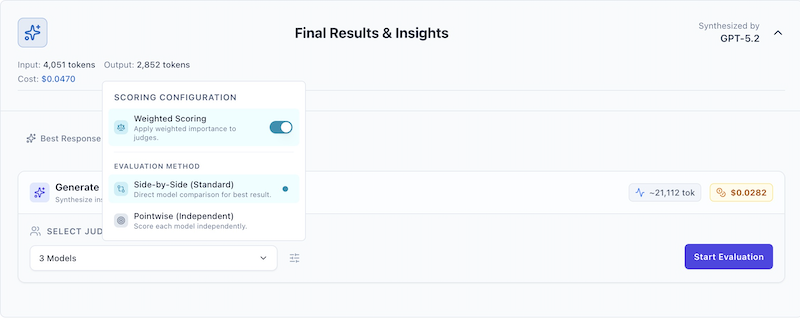
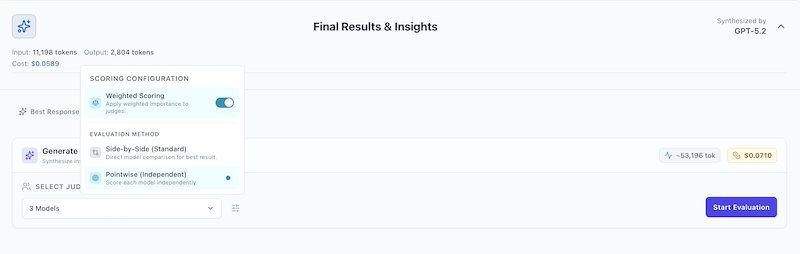
AI Crucible supports two distinct evaluation methodologies: side-by-side (standard) and pointwise. You can toggle between these modes by clicking the settings icon (sliders) in the evaluation panel.
What is side-by-side evaluation?
Side-by-side evaluation presents all responses simultaneously to judge models for direct comparison. Judges explicitly rank responses relative to each other, identifying the best answer through competitive analysis.
Use cases:
- Competitive benchmarking across models
- "Best of N" selection scenarios
- Identifying relative strengths and weaknesses
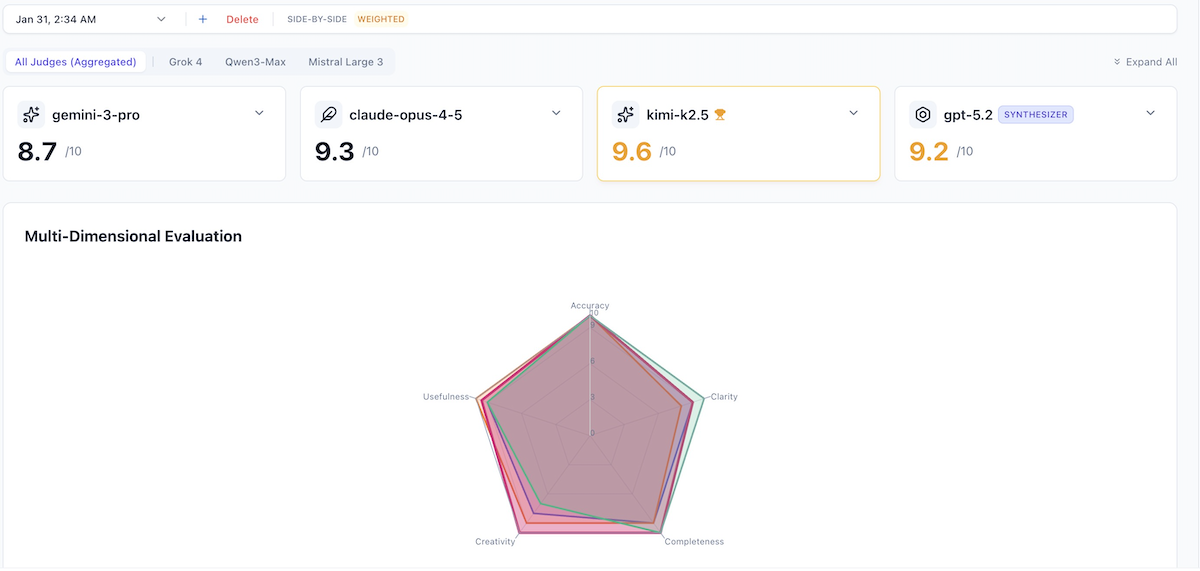
Sample evaluation results:
For a prompt asking three models (Gemini 3 Pro, Kimi K2.5, Claude Opus 4.5) to design a distributed caching strategy:
| Model | Score | Reasoning Summary |
|---|---|---|
| Gemini 3 Pro | 9.5/10 | Highly actionable, concrete patterns like Hospital Queue |
| Kimi K2.5 | 9.5/10 | Strong lifecycle focus, aligns with senior engineering intuition |
| Claude Opus 4.5 | 9.1/10 | Sovereign cells concept is sound but less prescriptive |
What is pointwise evaluation?
Pointwise evaluation assesses each response independently without comparison. Judges evaluate quality against absolute standards rather than relative performance. Multiple responses can receive the same score.
Use cases:
- Absolute quality assessment
- Compliance checking
- Individual model performance tracking over time
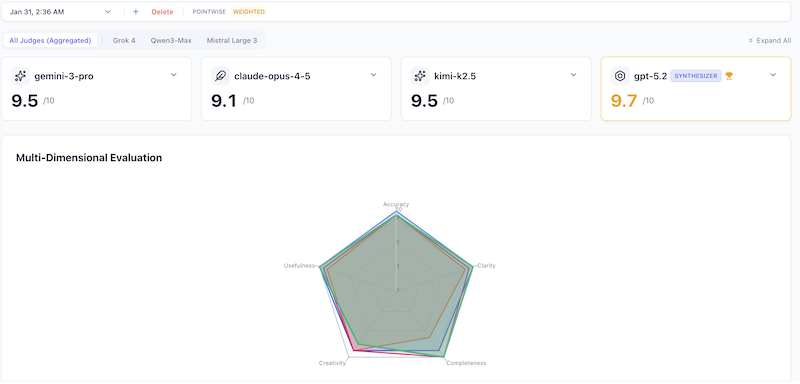
Sample evaluation results:
Same caching prompt, pointwise mode with Gemini 3 Flash as judge:
| Model | Score | Independent Assessment |
|---|---|---|
| Gemini 3 Pro | 9.4/10 | Excellent detail on isolation patterns |
| Kimi K2.5 | 9.3/10 | Strong operational lifecycle focus |
| Claude Opus 4.5 | 9.0/10 | Good theoretical architecture |
Key difference: Scores are NOT relative. A response can score 9/10 even if another response is superior—each is judged against absolute quality standards.
How do I configure judges for evaluations?
AI Crucible supports single-judge and multi-judge configurations. The number of judges affects cost, evaluation time, and result reliability.
When should I use a single judge?
Single-judge evaluations use one model to evaluate all responses. This approach minimizes cost and latency while maintaining consistent scoring perspective.
Benefits:
- Faster evaluation (one LLM call instead of multiple)
- Lower token usage and cost
- Consistent scoring perspective across all responses
Limitations:
- Potential single-viewpoint bias
- No variance or disagreement metrics available
Best for: Routine evaluations, cost-sensitive workflows, situations requiring consistent perspective
[!TIP] Access advanced configuration by clicking the sliders icon next to the judge selector.
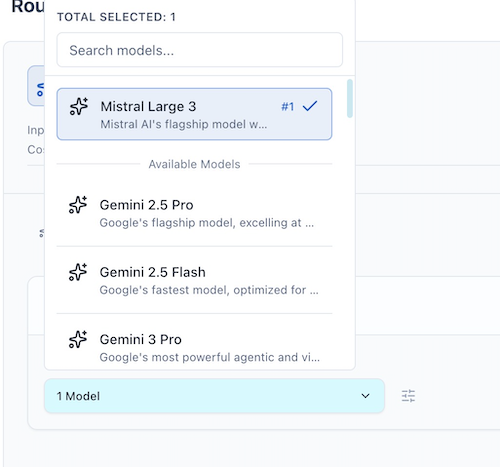
When should I use multiple judges?
Multi-judge evaluations use 2+ models to assess responses independently. Scores are aggregated using weighted or arithmetic mean consensus.
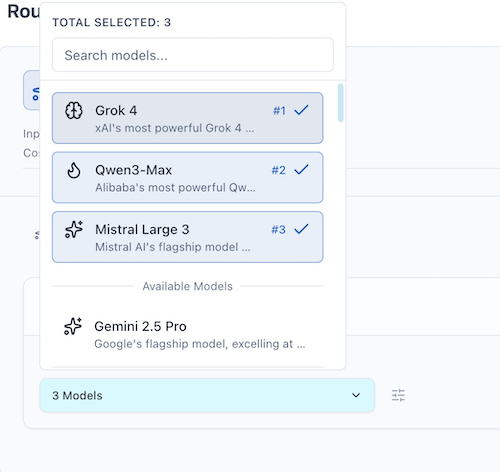
Weighted consensus scoring:
When enabled via the settings menu (sliders icon), judges who assign higher scores receive more influence on the consensus. This approach assumes higher confidence correlates with better judgment quality.
How does the evaluations dashboard work?
The Evaluations Dashboard provides centralized access to all historical evaluations with filtering, tagging, and export capabilities. Access it via Settings > Evaluations History in the navigation menu.
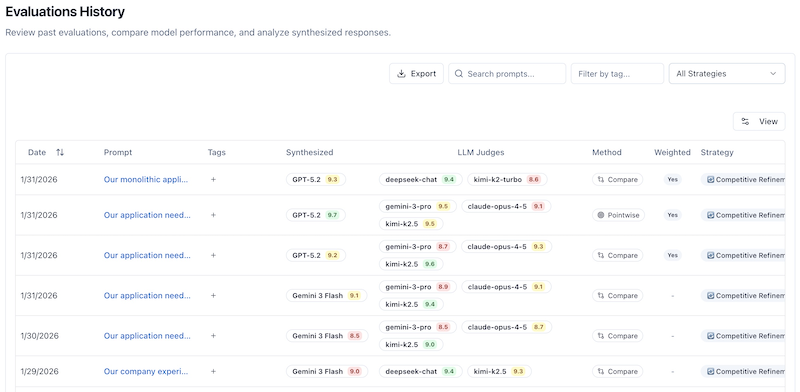
What features does the dashboard include?
The dashboard displays up to 50 most recent evaluations with live updates as new evaluations complete.
Key columns:
- Date - When the evaluation was created
- Prompt - Preview of the prompt (click to expand full text)
- Tags - User-defined labels for organization
- Synthesized - The arbiter's score for the best answer
- LLM Judges - Individual scores from judge models
- Method - Side-by-Side or Pointwise
- Weighted - Whether weighted scoring was enabled
- Strategy - Ensemble strategy used (Competitive Refinement, Expert Panel, etc.)
- Iters - Number of refinement rounds
- Tokens - Total token usage
- Actions - Delete or navigate to chat
Actions available:
- Click any row to view full evaluation details
- Click the chat icon to navigate to the original session
- Click the delete icon to remove an evaluation
- Use filters to narrow results
How do I filter and search evaluations?
The dashboard provides three filtering mechanisms that work together:
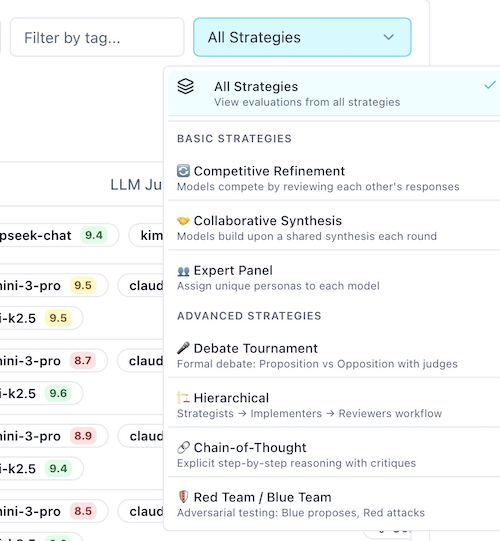
Strategy filter: Select from dropdown to show only evaluations from specific strategies (Competitive Refinement, Expert Panel, Collaborative Synthesis, etc.). Default is "All".
Tag filter: Type to search for evaluations containing specific tags. Matches are case-insensitive and search across all tags assigned to each evaluation.
Prompt search: Enter text to search within prompt content. Useful for finding specific evaluations by topic or identifier.
All filters combine using AND logic—evaluations must match all active filters to appear in the results.
How do I tag evaluations for organization?
Tagging provides custom organization beyond built-in filters. Add tags when creating evaluations or retroactively from the dashboard.
Common tag patterns:
production-ready- Approved for deploymentneeds-review- Requires human verificationbenchmark-2026-01- Monthly benchmark batchbest-architecture- Reference implementationscost-optimized- Budget-constrained scenarios
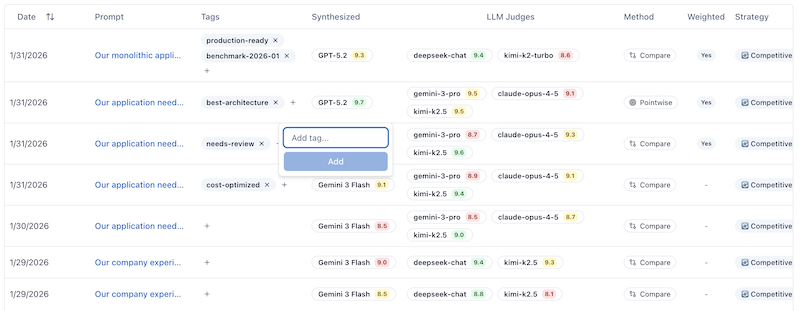
Tags appear in the dashboard table and are included in CSV/JSON exports for downstream processing.
How do I export evaluation data?
Export functionality generates CSV or JSON files for offline analysis, archival, or sharing.
CSV export: Generates a spreadsheet-compatible file with columns for ID, Date, Prompt, Strategy, Method, Weighted status, Judges, Scores, Token usage, Cost, and Tags. Perfect for Excel or Google Sheets analysis.
JSON export: Exports complete evaluation documents including full criteria breakdowns, individual judge reasoning, and all metadata. Ideal for programmatic processing or detailed archival.
Export scope: Exports include only evaluations visible after applying active filters. To export all evaluations, remove all filters first.
Common use cases:
- Offline analysis in spreadsheet tools
- Long-term archival beyond 50-evaluation dashboard limit
- Sharing evaluation data with team members
- Importing into custom analytics tools
What are the evaluation criteria?
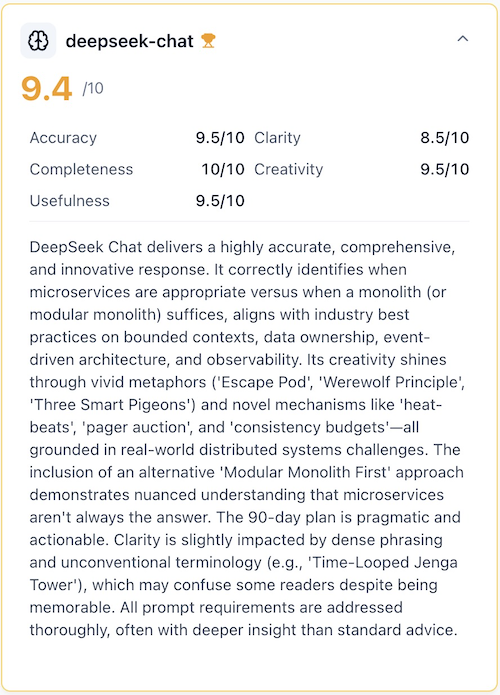
Judges evaluate responses using five standard criteria, each scored 0-10:
| Criterion | Definition |
|---|---|
| Accuracy | Factual correctness and technical precision |
| Creativity | Novel approaches and innovative thinking |
| Clarity | Communication effectiveness and readability |
| Completeness | Thoroughness and coverage of requirements |
| Usefulness | Practical applicability and actionable value |
Each criterion contributes equally (20%) to the overall score. The overall score is the arithmetic mean of all five criteria.
Strategy-specific criteria:
For team-based strategies like Red Team/Blue Team, Debate Tournament, or Hierarchical, role-specific criteria replace the standard five. For example:
- Red Team: Attack Validity, Severity, Creativity, Exploitability, Constructiveness
- Blue Team: Solution Robustness, Security Coverage, Completeness, Defense Effectiveness, Maintainability
- Proposition/Opposition: Argument Strength, Evidence Quality, Logical Coherence, Rebuttal Effectiveness, Persuasiveness
Best Practices
How do I choose the right evaluation method?
Match evaluation mode to your use case:
| Use Case | Recommended Method | Rationale |
|---|---|---|
| Selecting best response | Side-by-Side | Direct comparison highlights strengths |
| Quality assurance | Pointwise | Absolute standards, not relative |
| Benchmarking | Side-by-Side + Multi-Judge | Reduces bias, provides variance |
| Cost optimization | Side-by-Side + Single Judge | Minimizes LLM calls |
How many judges should I use?
Judge count affects cost, reliability, and bias:
- Critical decisions: Use 3+ judges from different providers (GPT, Claude, Gemini) to minimize provider bias
- Routine evaluations: Use single fast judge (e.g., Gemini 3 Flash) for cost efficiency
- Weighted scoring: Enable for multi-judge scenarios where judge confidence varies
How do I optimize token usage?
Token optimization strategies:
- Pre-filter responses: Remove obviously poor responses before evaluation to reduce token usage
- Prompt compression: Use concise, focused prompts to minimize input tokens
- Judge selection: Choose efficient models for routine work (Gemini Flash, GPT-4o Mini)
- Batch evaluations: Group similar evaluations to amortize system overhead
How do I manage dashboard storage?
The dashboard shows the 50 most recent evaluations for performance. Management strategies:
- Tag early: Add tags immediately after generation for easier filtering
- Export regularly: Download CSV/JSON backups before hitting the limit
- Archive old evaluations: Export and delete entries no longer needed for active reference
- Use search: Leverage prompt and ID search to find specific evaluations quickly
Frequently Asked Questions
What is the difference between weighted and arithmetic mean scoring?
Weighted scoring gives higher-confidence judges more influence on the consensus score. Judges who assign higher scores receive increased weight based on a quadratic formula. Arithmetic mean treats all judges equally regardless of their individual scores.
Use weighted scoring when judge expertise varies or when you want confident assessments to dominate consensus.
Can I evaluate responses from different strategies?
Yes. Evaluations work with any ensemble strategy output. The evaluation system receives model responses and metadata but doesn't depend on how responses were generated.
You can evaluate Competitive Refinement, Expert Panel, Collaborative Synthesis, or any other strategy outputs using the same evaluation framework.
How long do evaluations take?
Side-by-side evaluations complete in 10-20 seconds for single judge, 30-60 seconds for 3 judges. Pointwise evaluations take 20-40 seconds for single judge, 60-120 seconds for 3 judges evaluating 4 responses.
Time varies based on model selection, response length, and provider latency.
How do I access evaluation settings?
Click the sliders icon next to the judge selection input to open the configuration menu. Here you can toggle Weighted Scoring (for multi-judge setups) and select your Evaluation Method (Side-by-Side vs Pointwise).
Why is my evaluation divergence high?
High divergence (>10%) indicates judge disagreement. Common causes:
- Subjective evaluation criteria (creativity, usefulness)
- Responses have different strengths across criteria
- Judge models have different biases or priorities
- Ambiguous or multi-faceted prompt
High divergence isn't necessarily problematic—it reveals genuine uncertainty. Consider adding more judges or refining evaluation criteria.
Can I rerun evaluations with different judges?
No, evaluations are immutable after creation. To evaluate with different judges, generate a new evaluation from the same chat session. This preserves historical comparisons and prevents data corruption.
Each evaluation creates an independent record in your dashboard.
How do I interpret variance metrics?
Variance measures score spread across judges. Low variance (<0.2) indicates agreement, moderate variance (0.2-0.5) shows some disagreement, high variance (>0.5) reveals significant judge divergence.
Divergence percentage converts variance to 0-100% scale. Aim for <10% divergence for confident consensus results.
What happens to evaluations when I delete a chat?
Evaluations are stored independently from chat sessions. Deleting a chat does not delete associated evaluations—they remain accessible in the dashboard. However, the navigation link to the original chat will no longer work.
To fully remove evaluation data, delete evaluations individually from the dashboard.
Can I evaluate chats created before evaluation features existed?
Yes, but only if the chat session preserved model responses. Retroactive evaluation generates new judge assessments for historical data. Navigate to the chat, click "Evaluate", and configure judges as normal.
Older chats that didn't save individual model responses cannot be evaluated.