Ensemble AI Evals User Feedback
Every time you use AI Crucible, you're making decisions about quality. Which response was most helpful? Which model gave the best answer? These judgments are valuable—they reveal your preferences, standards, and what actually works for your use cases.
AI Crucible's feedback system captures these insights automatically. Your feedback helps the platform learn which models and strategies deliver the best results for different types of tasks, enabling smarter recommendations over time.
Reading time: 6-8 minutes
Table of Contents
- Why Does Feedback Matter?
- How Do I Provide Feedback in AI Crucible?
- Does My Feedback Actually Matter?
- The Review Queue: Refine Your Golden Dataset
- How Will This Help Me in the Future?
Why Does Feedback Matter?
Your feedback teaches AI Crucible what good looks like for your specific needs. When you mark a response as helpful or select a best answer, you're creating a record of success that the platform can learn from.
This feedback reveals patterns over time. You might discover that Claude Sonnet consistently delivers better code reviews, or that Competitive Refinement produces superior marketing copy. These insights help you make faster, more confident decisions about which models and strategies to use.
Without feedback, every session starts from scratch. With feedback, AI Crucible builds a personalized understanding of your preferences and use cases.
How Do I Provide Feedback in AI Crucible?
AI Crucible offers three simple ways to share your feedback. Each method captures different types of insights about model performance and response quality.
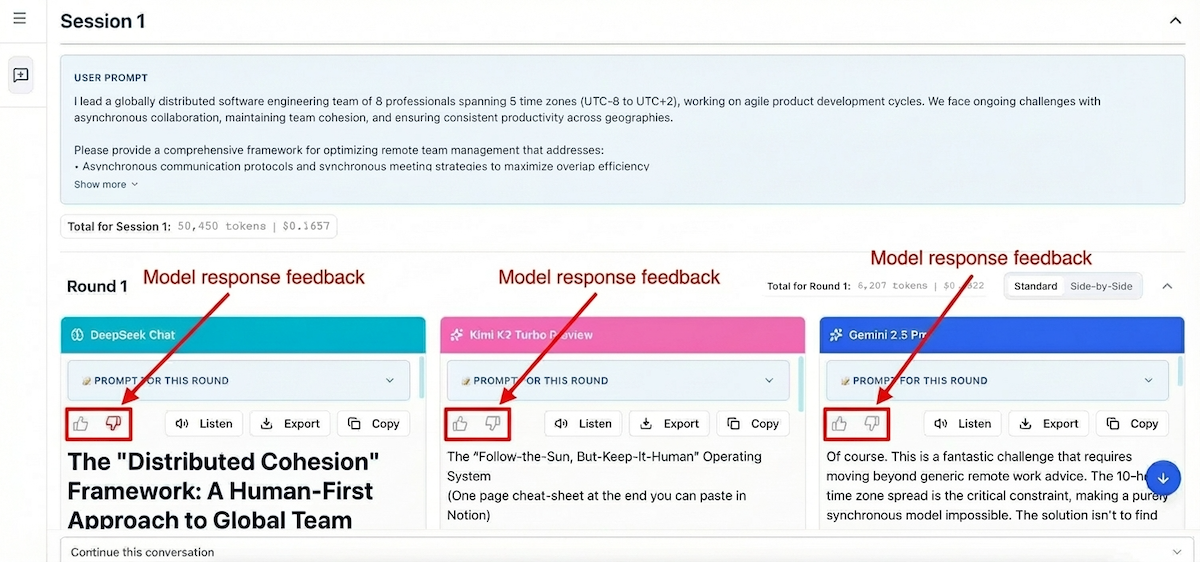
Thumbs Up/Down on Individual Responses
Every model response includes thumbs up and thumbs down buttons. Use these to quickly rate individual outputs during or after generation.
When to use:
- A specific model's response was particularly helpful or unhelpful
- You want to track which models perform best for your tasks
- Quick feedback without interrupting your workflow
Best Answer Selection
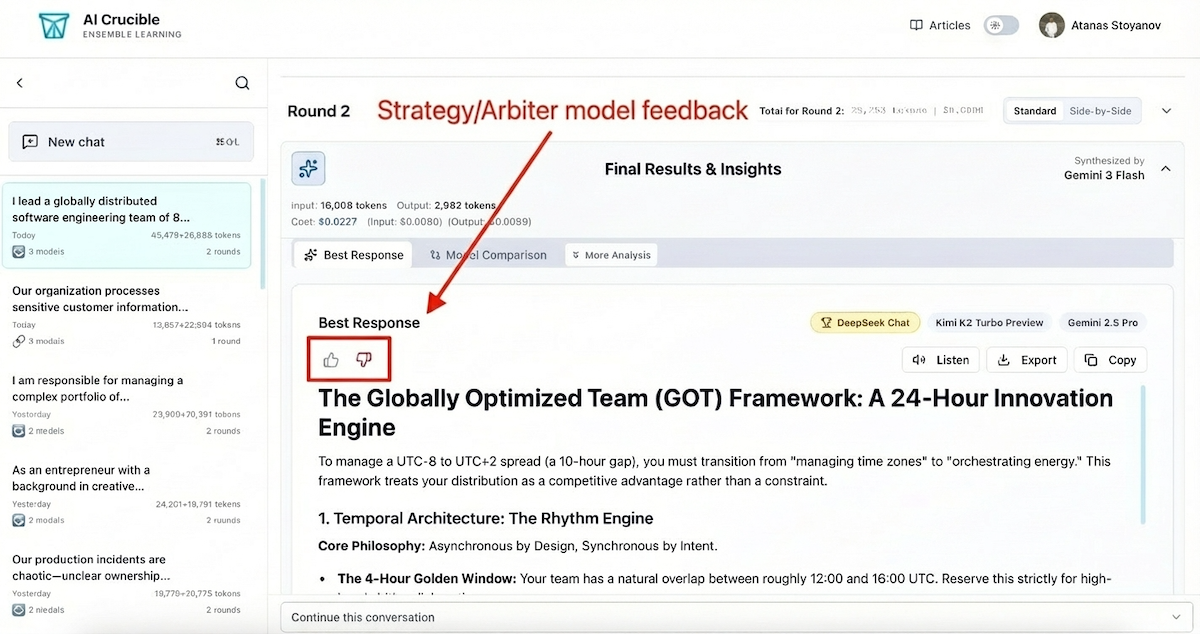
When using strategies like Competitive Refinement or Final Comparison, AI Crucible synthesizes a "Best Response" from multiple model outputs. The feedback buttons on this synthesis capture your satisfaction with the overall result.
When to use:
- The final synthesized answer met or exceeded your expectations
- You want to indicate whether the ensemble strategy was effective
- Evaluating the arbiter model's judgment quality
Detailed Reviews in the Queue
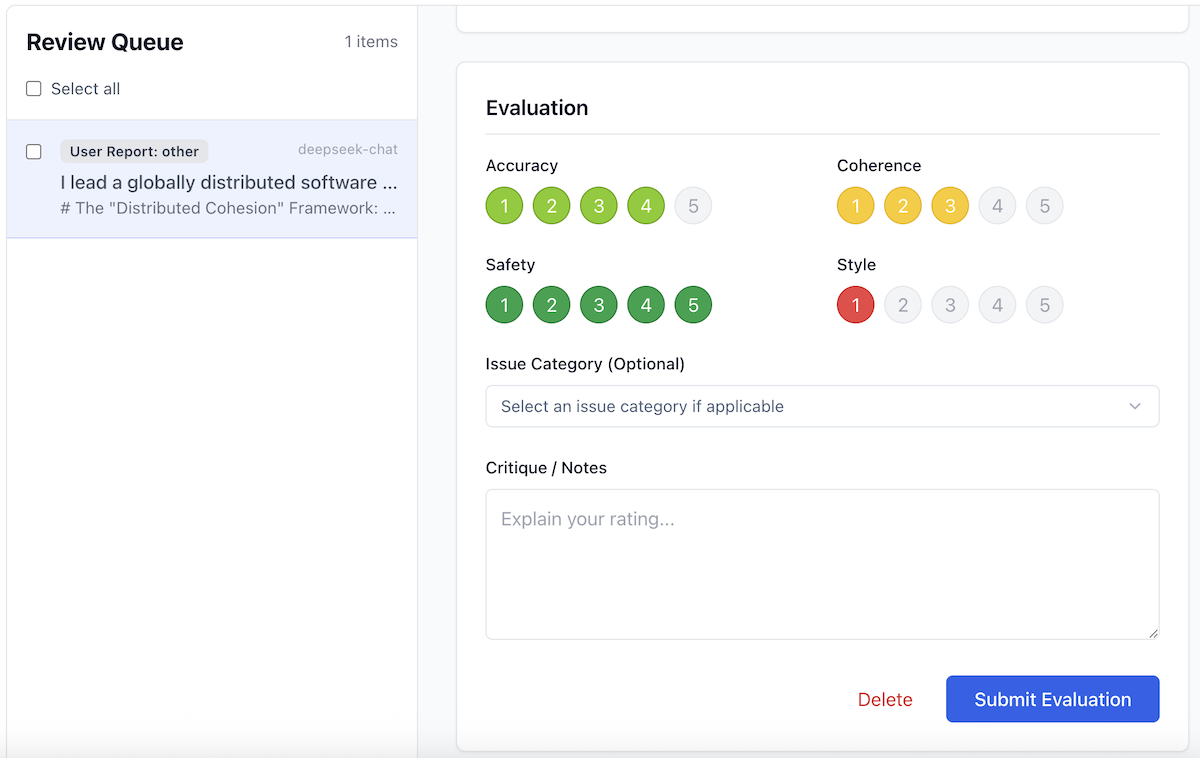
For specific interactions that require deeper analysis, you can use the Review Queue. This allows you to rate responses on four precise dimensions—Accuracy, Coherence, Safety, and Style—turning a simple "thumbs down" into actionable training data.
Does My Feedback Actually Matter?
Yes. AI Crucible uses your feedback to continuously improve recommendations and system quality.
Continuous Improvement
When you mark a response as unhelpful, it flags that specific interaction for quality analysis. We look for patterns where models might struggle with certain types of prompts or where ensemble strategies didn't produce the best outcome. This data directly influences how we tune our meta-prompts and strategy logic.
Task Classification
AI Crucible automatically categorizes your prompts into types like Coding, Creative Writing, Analysis, or Reasoning. By linking your feedback to these categories, the system learns which models excel at different tasks.
Performance Tracking
The system tracks which models receive the "Best Answer" designation most often. When multiple models compete in an ensemble, your feedback on the final synthesis helps determine the true winner—not just who the arbiter thought won, but who actually delivered the best result for you.
The Review Queue: Refine Your Golden Dataset
AI Crucible helps you build a high-quality personalized dataset through the Review Queue. This feature allows you to perform detailed evaluations on specific interactions, ensuring the system perfectly understands your standards.
How Responses Enter Your Queue
Items will appear in your Review Queue in two ways:
- Negative Feedback: When you mark a response as unhelpful (thumbs down), it is automatically added to the queue. This gives you a chance to explain why it failed—was it inaccurate, unsafe, or just the wrong style?
- Quality Sampling: Occasionally, positive interactions are selected for the queue. Reviewing these ensures that the system isn't just avoiding bad results, but is actively aligned with your definition of excellence.
The Review Process
In the Review Queue, you can provide granular feedback beyond a simple thumbs up or down. For each response, you can rate four key dimensions on a 5-point scale:
- Accuracy: Did the model provide factually correct information?
- Coherence: Was the response logical, well-structured, and easy to follow?
- Safety: Did the response adhere to safety guidelines and avoid harmful content?
- Style: Did the tone and format match your request?
Ratings are color-coded from Red (1 star) to Green (5 stars), giving you an immediate visual indicator of quality across different metrics.
Efficient Queue Management
Managing a large dataset requires efficient tools. The Review Queue now supports Bulk Actions:
- Mark as Read/Unread: Keep track of what you've reviewed without losing context. Unread items are highlighted with a blue badge for quick identification.
- Bulk Delete: Quickly remove irrelevant entries to keep your queue focused.
How Will This Help Me in the Future?
The feedback you provide today builds a foundation for a personalized AI experience. Your collected feedback enables powerful customization features.
Personalized Model Recommendations
AI Crucible learns your preferences over time. If you consistently rate Claude Sonnet positively for code reviews but prefer GPT-5 for creative writing, the platform can suggest optimal model selections based on your specific prompt type.
Strategy Optimization
Your feedback reveals which ensemble strategies work best for your specific use cases. AI Crucible can recommend Competitive Refinement for tasks where you've historically preferred its results, or suggest Expert Panel when multi-perspective analysis has delivered better outcomes for you.
Quality Benchmarking
Your feedback creates a personal quality baseline. You'll be able to compare new results against your historical preferences, helping you quickly identify whether a response meets your standards.
Cost-Effectiveness Insights
Combined with cost tracking, feedback data shows which models deliver the best value for your needs. You might discover that a faster, cheaper model performs just as well as premium options for certain task types.
Start providing feedback today. Every thumbs up or down makes AI Crucible smarter for your specific needs. Open the Dashboard and try the feedback features on your next session.