Custom Models Integration: Bring Your Own AI Infrastructure
AI Crucible now supports custom model integration, letting you connect self-hosted models, cloud AI services, and specialized APIs to your ensemble workflows. This guide shows you how to integrate your own AI infrastructure while maintaining the benefits of ensemble orchestration.
What you'll learn:
- What custom models are and why you'd use them
- How to connect OpenAI-compatible APIs
- Setting up NVIDIA AI, OpenRouter, and self-hosted models
- Security best practices for API keys
- Using custom models in ensemble strategies
- Troubleshooting common integration issues
Time to read: 8-10 minutes
What are custom models in AI Crucible?
Custom models let you connect your own AI infrastructure to AI Crucible through OpenAI-compatible APIs. You can integrate self-hosted models (running on your servers), cloud AI services (like NVIDIA AI), or API aggregators (OpenRouter) and use them alongside built-in models in ensemble workflows.
AI Crucible includes 40+ pre-configured models from major providers (OpenAI, Anthropic, Google, DeepSeek). Custom models expand this by letting you:
- Run proprietary models - Use your company's fine-tuned models in ensemble workflows
- Control your infrastructure - Keep sensitive data on your own servers
- Access specialized models - Connect to niche models optimized for specific domains
- Reduce costs - Use cost-effective cloud services or self-hosted deployments
- Test experimental models - Integrate cutting-edge models not yet in production
Custom models work seamlessly with AI Crucible's ensemble strategies. Mix a self-hosted model with Claude and GPT-5 in Competitive Refinement, or use specialized models as domain experts in Expert Panel discussions.
Why would I use custom models?
Custom models solve specific problems that built-in models can't address. Run models on your infrastructure for data privacy compliance. Access specialized models fine-tuned for your industry. Reduce costs with cost-effective cloud services, test proprietary models, and maintain full control over your AI stack.
Common use cases:
Privacy and Compliance - Keep sensitive data within your infrastructure. Healthcare organizations can run HIPAA-compliant models on private servers. Financial institutions can maintain data sovereignty while still using ensemble AI.
Cost Optimization - Use cost-effective cloud AI services or self-hosted deployments. Services like NVIDIA AI offer competitive pricing. Use custom models for high-volume tasks (like drafts in Competitive Refinement Round 1) and premium models for final analysis.
Specialized Domains - Connect fine-tuned models optimized for your industry. Legal firms can integrate models trained on case law. Medical researchers can use models fine-tuned on medical literature. Integrate domain-specific models alongside general-purpose ones for comprehensive analysis.
Experimental Models - Test new models before they're available through major APIs. Try open-source models gaining traction in research. Evaluate proprietary models your team developed.
Infrastructure Control - Maintain full control over model selection, versioning, and deployment. Switch model versions without waiting for provider updates. Deploy models in your preferred cloud regions.
How do I add a custom model?
Navigate to Settings → Custom Models and click "Add Custom Model." Configure the display name, model name (API identifier), base URL (your API endpoint), optional API key, and customize appearance with model color. The model appears alongside built-in models in all ensemble workflows.
Step-by-Step Setup
Navigate to Custom Models:
Settings (⌘/Ctrl+,) → Custom Models (/user/custom-models)
Click "Add Custom Model"
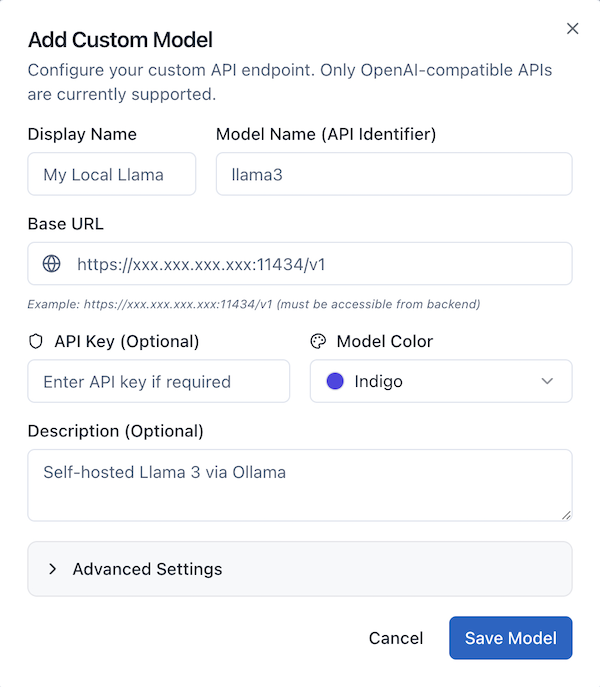 Configure Required Fields:
Display Name - How the model appears in AI Crucible
- Example:
NVIDIA Nemotron Nano 30B - Use descriptive names that identify the model clearly
Model Name (API Identifier) - The exact identifier your API uses
- Example:
nvidia/nemotron-3-nano-30b-a3b(NVIDIA AI) - Example:
meta-llama/llama-3.1-70b-instruct(OpenRouter) - Check your API documentation for the exact identifier
- This is sent in the
modelfield of API requests
Base URL - Your API endpoint
- Must be OpenAI-compatible (supports
/v1/chat/completions) - Example:
https://integrate.api.nvidia.com/v1(NVIDIA AI) - Example:
https://openrouter.ai/api/v1(OpenRouter) - Example:
https://your-server.com/v1(Self-hosted) - Must be accessible from AI Crucible's backend servers
API Key (Optional) - Authentication token
- Required for cloud services (NVIDIA AI, OpenRouter)
- Leave blank for self-hosted deployments without authentication
- Encrypted at rest using AES-256-GCM
Model Color - Visual identifier in the UI
- Choose from preset colors (Indigo, Purple, Blue, Green, Yellow, Red, Pink, Teal, Orange, Cyan, Slate, Violet)
- Helps distinguish custom models from built-in ones
Description (Optional) - Notes about the model
- Example:
NVIDIA Nemotron Nano - fast and cost-effective - Visible in model selection tooltips
Advanced Settings:
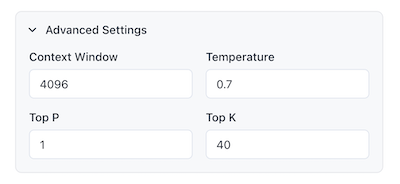
Context Window - Maximum input tokens
- Default: 4096 tokens
- LLaMA 3: 8192 tokens
- GPT-4: 128000 tokens
- Check your model's documentation
Temperature - Creativity setting (0-2)
- Default: 0.7
- Lower (0.3): More focused, deterministic
- Higher (1.0): More creative, diverse
Top P - Nucleus sampling (0-1)
- Default: 1.0
- Controls diversity by sampling from top probability mass
- Most models work well at default
Top K - Limits vocabulary to K most likely tokens
- Default: 40
- Lower values (10-20): More focused responses
- Higher values (50-100): More diverse vocabulary
- Set to 0 to disable
- Used by some models for additional output control
Click "Save Model" - Your custom model is now available!
What does OpenAI-compatible API mean?
An OpenAI-compatible API follows OpenAI's REST API specification, specifically the /v1/chat/completions endpoint format. This standard is widely adopted by cloud AI services (NVIDIA AI), API aggregators (OpenRouter), and self-hosted deployments, making them plug-and-play compatible with AI Crucible.
The OpenAI API specification defines how to structure requests and responses when talking to AI models. It's become the de facto standard for model serving, similar to how REST became the standard for web APIs.
What makes an API OpenAI-compatible?
Endpoint Structure - Uses /v1/chat/completions for chat
/v1/completionsfor text completion (legacy)
Request Format - Accepts messages in this structure:
{
  "model": "llama3",
  "messages": [{ "role": "user", "content": "Your prompt here" }],
  "temperature": 0.7,
  "max_tokens": 1000
}
Response Format - Returns structured responses:
{
  "id": "chatcmpl-123",
  "choices": [
    {
      "message": {
        "role": "assistant",
        "content": "Response text here"
      },
      "finish_reason": "stop"
    }
  ],
  "usage": {
    "prompt_tokens": 20,
    "completion_tokens": 100,
    "total_tokens": 120
  }
}
Streaming Support - Supports Server-Sent Events (SSE) for real-time response streaming
Popular OpenAI-Compatible Platforms:
- NVIDIA AI - Cloud-hosted AI models with competitive pricing
- OpenRouter - Unified API for 100+ models
- vLLM - High-performance self-hosted model serving
- TGI (Text Generation Inference) - Hugging Face's model server
- Custom self-hosted - Your own infrastructure running OpenAI-compatible APIs
AI Crucible works with any platform that follows this specification.
How do I set up NVIDIA AI integration?
Sign up at build.nvidia.com, get an API key, and configure AI Crucible with base URL https://integrate.api.nvidia.com/v1, model name nvidia/nemotron-3-nano-30b-a3b, and your NVIDIA API key. NVIDIA AI provides cloud-hosted models with competitive pricing and fast inference.
Complete NVIDIA AI Setup
Create Account:
Visit build.nvidia.com
Sign up for free account
Get $10 in free credits to start
Get API Key:
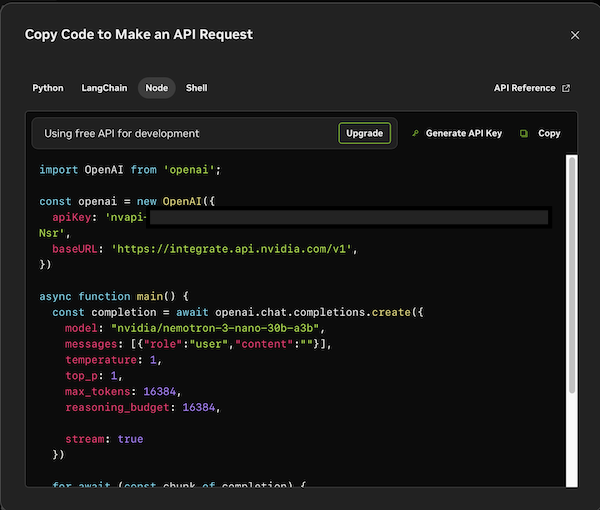 Dashboard → API Keys → Generate Key
Copy your key (starts with nvapi-...)
Browse Available Models:
Check NVIDIA AI Catalog for available models
Popular options:
nvidia/nemotron-3-nano-30b-a3b- Fast, efficient, cost-effectivenvidia/llama-3.1-nemotron-70b-instruct- Powerful reasoningmistralai/mistral-7b-instruct-v0.3- Balanced performance
Test Your Endpoint:
# Verify API access
curl https://integrate.api.nvidia.com/v1/chat/completions \
  -H "Content-Type: application/json" \
  -H "Authorization: Bearer nvapi-YOUR-KEY-HERE" \
  -d '{
    "model": "nvidia/nemotron-3-nano-30b-a3b",
    "messages": [{"role": "user", "content": "Hello"}],
    "max_tokens": 50
  }'
Add to AI Crucible:
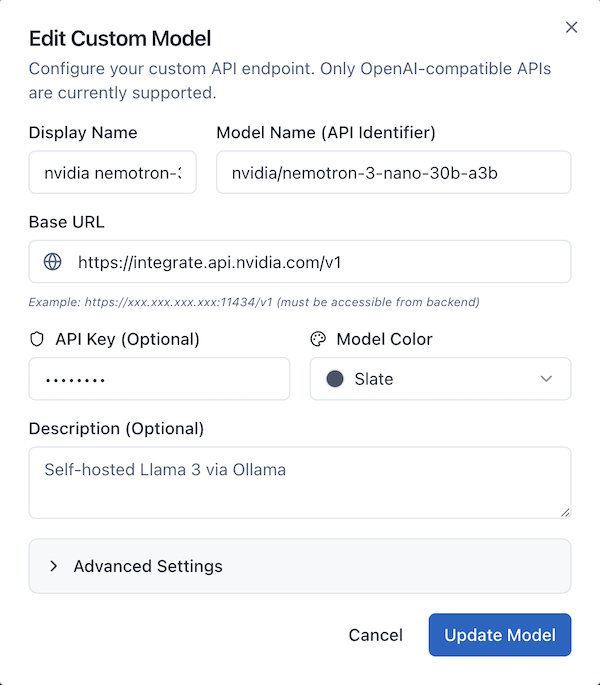
Settings → Custom Models → Add Custom Model
- Display Name:
NVIDIA Nemotron Nano 30B - Model Name (API Identifier):
nvidia/nemotron-3-nano-30b-a3b - Base URL:
https://integrate.api.nvidia.com/v1 - API Key:
nvapi-your-key-here - Model Color: Choose your preferred color (e.g., Slate)
- Description:
NVIDIA Nemotron - fast and cost-effective
Advanced Settings (optional):
- Context Window:
4096 - Temperature:
0.7 - Top P:
1 - Top K:
40
Use in Ensemble Workflows:
Your NVIDIA model appears alongside built-in models in model selection dropdowns. Mix cost-effective NVIDIA models with premium models for balanced ensemble strategies.
How do I connect OpenRouter models?
Sign up at openrouter.ai, get an API key, and configure AI Crucible with base URL https://openrouter.ai/api/v1, your chosen model name (like meta-llama/llama-3.1-70b-instruct), and your OpenRouter API key. OpenRouter gives you access to 100+ models through a single API.
OpenRouter Integration Guide
Why Use OpenRouter?
- Access 100+ models - From multiple providers through one API
- Unified billing - Single invoice for all model usage
- Dynamic routing - Automatic failover if a model is down
- Competitive pricing - Often cheaper than direct provider APIs
Setup Steps:
Create Account:
Visit openrouter.ai
Sign up (free account with $1 credit)
Get API Key:
Dashboard → API Keys → Create Key
Copy your key (starts with sk-or-v1-...)
Browse Models:
Check the Models page for available models
Note the exact model identifier
Popular options:
meta-llama/llama-3.1-70b-instructanthropic/claude-3.5-sonnetgoogle/gemini-2-pro-expmistralai/mistral-large
Configure in AI Crucible:
- Display Name:
LLaMA 3.1 70B (OpenRouter) - Base URL:
https://openrouter.ai/api/v1 - Model Name:
meta-llama/llama-3.1-70b-instruct - API Key:
sk-or-v1-your-key-here - Context Window:
128000 - Description:
LLaMA 3.1 70B via OpenRouter - powerful open source
Add Multiple Models:
You can add multiple OpenRouter models using the same API key. This gives you access to diverse model families through one provider:
- LLaMA models (open source, cost-effective)
- Claude models (without direct Anthropic account)
- Experimental models (cutting-edge research models)
- Specialized models (coding, math, reasoning)
Cost Tracking:
OpenRouter usage doesn't appear in AI Crucible's cost metrics (since it's external). Check OpenRouter's dashboard for usage analytics and billing.
How secure are my API keys?
AI Crucible encrypts API keys at rest using AES-256-GCM encryption before storing them in our database. Keys are only decrypted server-side when making API calls and are never exposed to client code or logs. This enterprise-grade encryption ensures your credentials remain secure even if the database is compromised.
Security Best Practices:
Use Read-Only Keys When Possible - If your API provides read-only keys (for inference only), use those instead of admin keys.
Rotate Keys Regularly - Change API keys every 90 days for enhanced security.
Use Dedicated Keys - Create separate API keys for AI Crucible rather than sharing keys across tools.
Monitor Usage - Check your API provider's dashboard for unexpected activity.
Self-Hosted for Sensitive Work - For highly sensitive data, use self-hosted models on your own infrastructure with restricted network access.
How do I use custom models in ensemble strategies?
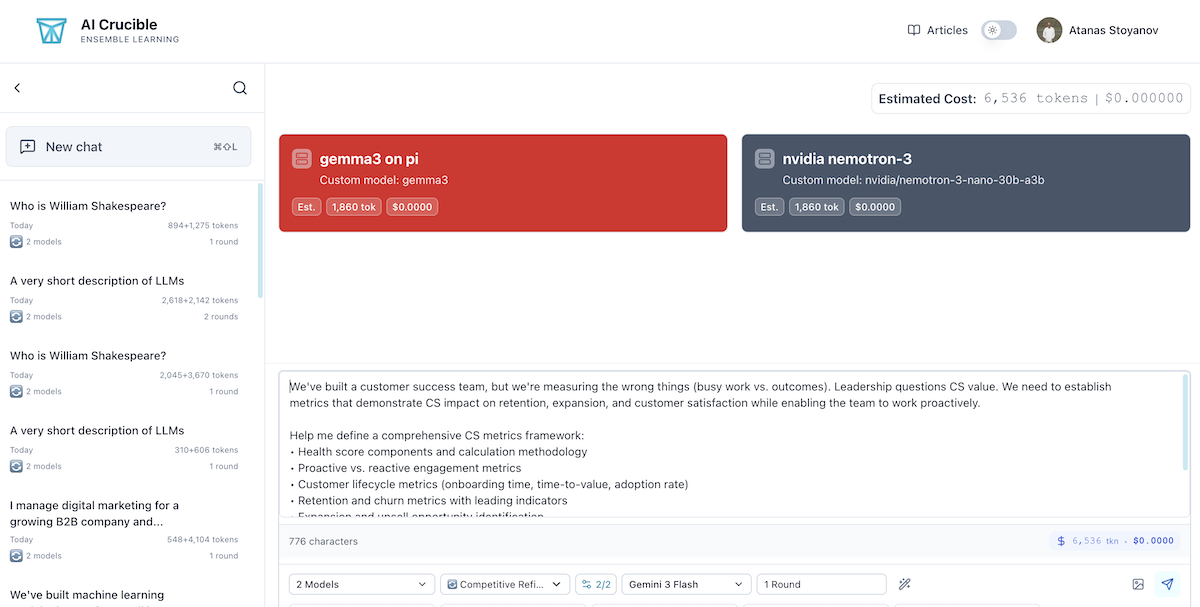
Select custom models alongside built-in models in any strategy's model picker. Custom models appear with a server icon and your chosen header color. They participate fully in all rounds, receive the same prompts, and their responses are evaluated alongside other models in the arbiter's comparative analysis.
Practical Ensemble Patterns
Cost-Optimized Competitive Refinement:
Use cost-effective cloud models for early rounds and premium models for final polish:
Round 1 (Draft Generation):
- NVIDIA Nemotron ($0.02)
- Gemini 2.5 Flash ($0.02)
- DeepSeek Chat ($0.01)
Round 2-3 (Refinement): Enable "Adaptive Iteration Count" to stop early when models converge.
Arbiter: GPT-5 Mini or Gemini 2.5 Flash (budget-friendly analysis)
Savings: 50-70% compared to all-premium models
Privacy-First Expert Panel:
Keep sensitive data on-premises while leveraging external expertise:
Internal Analysis (Self-Hosted Models):
- Legal LLM (fine-tuned on your case law)
- Finance LLM (fine-tuned on your data)
External Perspective (API Models):
- Claude Sonnet 4.5 (ethical considerations)
- GPT-5 (creative alternatives)
Assign expert personas to each model. Self-hosted models handle proprietary data while API models provide general expertise.
Hybrid Debate Tournament:
Test ideas using diverse model architectures:
Team A (Open Source via OpenRouter):
- LLaMA 3.1 70B (broad reasoning)
- Qwen 2.5 (mathematical rigor)
Team B (Proprietary APIs):
- Claude Opus 4.5 (thoughtful critique)
- GPT-5.1 (creative counterarguments)
Different training approaches create more substantive debates.
Development Testing:
Validate your fine-tuned model against production models:
Your Custom Model:
- Your Company LLM v2 (being evaluated)
Baseline Comparisons:
- GPT-5 (industry standard)
- Claude Sonnet 4.5 (quality benchmark)
- Gemini 2.5 Pro (cost benchmark)
Run Collaborative Synthesis to see how your model's output compares in real ensemble scenarios.
How much do custom models cost?
Custom model costs depend on your deployment choice. Cloud AI services (NVIDIA AI) charge per-token with competitive pricing. OpenRouter charges per-token, often cheaper than direct APIs. Self-hosted models have infrastructure costs but no per-token fees.
Cost Analysis by Deployment Type
Cloud AI Services (NVIDIA AI, etc.):
Costs:
- Per-token pricing (pay only for usage)
- No infrastructure costs
- No setup or maintenance time
Per-session cost: Varies by model ($0.01-0.10 typical)
Best for:
- Getting started quickly
- Variable workloads
- Testing custom model integration
- Cost-effective production use
Example pricing (NVIDIA Nemotron):
- 10,000 requests/month: ~$20-40
- Compare to GPT-5 Mini: ~$500
- Savings: $460-480/month (80-96% reduction)
OpenRouter:
Costs:
- Per-token pricing (varies by model)
- Often 20-50% cheaper than direct API access
- Single invoice for all models
Example pricing:
- LLaMA 3.1 70B: $0.52/$0.75 per million tokens (input/output)
- Compare to GPT-5: $2.50/$10.00 per million tokens
- 80% cost savings on similar capability models
Best for:
- Access to models you don't have direct API keys for
- Trying multiple models without multiple accounts
- Cost-conscious production workloads
Self-Hosted (AWS, GCP, Azure):
Costs:
- Infrastructure: $100-2,000+/month (GPU instances)
- Bandwidth: Varies by usage
- Management time: 5-10 hours/month
Per-session cost: $0 for API calls (after infrastructure costs)
Break-even point: ~50,000-100,000 requests/month
Best for:
- Large-scale production deployments
- Enterprise with existing cloud infrastructure
- Regulatory compliance requirements
Cost Optimization Strategies:
Mix Cost-Effective and Premium Models - Use budget cloud models for drafts (Round 1), premium models for refinement (Rounds 2-3).
Enable Adaptive Iteration Count - Stop early when models converge, saving rounds.
Strategic Model Selection - Use premium models only for final analysis or arbiter role.
Batch Processing - Run multiple prompts in sequence to amortize warm-up costs.
What if my custom model doesn't work?
Common issues include incorrect base URL (verify the endpoint and ensure /v1 suffix), wrong model name (check API documentation), API key problems (test authentication separately), and network issues (verify firewall rules). Test your endpoint with curl before adding to AI Crucible.
Troubleshooting Guide
Test Endpoint Directly:
Before adding to AI Crucible, verify your API works:
# Replace with your actual values
curl https://integrate.api.nvidia.com/v1/chat/completions \
  -H "Content-Type: application/json" \
  -H "Authorization: Bearer YOUR-API-KEY" \
  -d '{
    "model": "nvidia/nemotron-3-nano-30b-a3b",
    "messages": [{"role": "user", "content": "Say hello"}],
    "max_tokens": 50
  }'
Expected response: JSON with choices[0].message.content
If this fails, fix your API setup before configuring AI Crucible.
Common Issues and Solutions:
Error: "Connection refused" or "Network error"
Cause: AI Crucible can't reach your endpoint
Solutions:
- Verify the service is running and accessible
- Check if API endpoint URL is correct
- For self-hosted servers, ensure they're accessible from AI Crucible's backend
- Verify authentication is properly configured
- Check firewall rules and network connectivity
Error: "Model not found" or "Invalid model name"
Cause: Model identifier doesn't match API expectations
Solutions:
- NVIDIA AI: Use full model path (
nvidia/nemotron-3-nano-30b-a3b) - OpenRouter: Include namespace (
meta-llama/llama-3.1-70b-instruct) - Check your API docs for exact identifier
- Verify model is available in your API provider's catalog
Error: "Authentication failed" or "Invalid API key"
Cause: API key is wrong or expired
Solutions:
- Regenerate API key from your provider
- Copy the full key (check for truncation)
- For NVIDIA AI, ensure key starts with
nvapi- - For OpenRouter, ensure key starts with
sk-or-v1-
Error: "Model responds but output is garbled"
Cause: API returns non-standard format
Solutions:
- Verify API is OpenAI-compatible
- Check for proxy or middleware altering responses
- Try different model (some might not be fully compatible)
- Check API provider documentation for known issues
Error: "Timeout" or "Request too slow"
Cause: Model is too slow for AI Crucible's timeouts
Solutions:
- Use faster models or smaller variants
- Increase timeout in AI Crucible settings (if available)
- Choose cloud services with better latency
- Reduce context window setting
Still Having Issues?
Check Browser Console:
- Open Developer Tools (F12)
- Look for error messages in Console tab
- Share errors with support
Verify Configuration:
- Settings → Custom Models
- Edit your model
- Double-check all fields
- Try simplest configuration first (no advanced settings)
Test with Built-In Models:
- Verify AI Crucible works with standard models
- This isolates whether issue is custom model specific
Can I mix custom models with built-in models?
Yes. Custom models work seamlessly with built-in models in all ensemble strategies. You can select any combination—for example, NVIDIA Nemotron, GPT-5, and Claude Sonnet 4.5 together in Competitive Refinement. The arbiter treats all models equally, evaluating responses based on quality regardless of whether they're custom or built-in.
Best Practices for Mixing Models
Leverage Complementary Strengths:
Speed + Quality:
- Custom: Fast cloud model for quick responses
- Built-in: Premium model for high-quality refinement
Privacy + Expertise:
- Custom: Self-hosted for sensitive data processing
- Built-in: API models for general knowledge and creativity
Cost + Performance:
- Custom: Cost-effective cloud models for volume
- Built-in: Premium models for critical analysis
Strategy-Specific Recommendations:
Competitive Refinement:
- Round 1: 2 custom models (fast drafts)
- Round 2: 1 built-in premium (quality refinement)
- Round 3: All models converge
- Arbiter: Budget-friendly built-in (Gemini 2.5 Flash)
Expert Panel:
- Custom: Domain-specific experts (your fine-tuned models)
- Built-in: General experts (GPT-5, Claude)
- Each model gets appropriate persona based on capabilities
Debate Tournament:
- Team A: Custom models (company perspective)
- Team B: Built-in models (external perspective)
- Creates authentic internal vs. external debate
Evaluation Considerations:
The arbiter (typically a built-in model) evaluates all responses equally:
- No bias toward built-in or custom models
- Scoring based on content quality, not model type
- Custom models can win "best response" if they perform better
Performance Tips:
Start Rounds Simultaneously - Mix fast and slow models so they run in parallel.
Monitor Latency - If custom models are much slower, they'll delay the ensemble.
Balance Load - Don't use only slow custom models; mix with faster built-in ones.
What limitations do custom models have?
Custom models must support OpenAI-compatible API format, synchronous and streaming responses, and standard token counting. They don't integrate with AI Crucible's cost tracking (you manage billing externally), may have slower response times than optimized APIs, and require you to maintain uptime and handle errors. Context window limits depend on your model configuration.
Technical Requirements
API Compatibility:
Must support:
/v1/chat/completionsendpoint- JSON request/response format
- SSE (Server-Sent Events) for streaming
- Token usage reporting in responses
Optional but recommended:
- Authentication via Bearer token
- CORS headers for browser access
- Error responses in OpenAI format
Performance Considerations:
Response Time:
- Cloud models: 1-5 seconds typically
- Self-hosted models: 3-15 seconds depending on infrastructure
- AI Crucible timeout: 60 seconds default
- Slow models may cause round delays in ensemble
Throughput:
- Parallel execution limited by your infrastructure
- Built-in models handle concurrent requests
- Custom models need appropriate scaling
Context Window:
- Set accurately in configuration
- Exceeding limits causes failures
- AI Crucible won't auto-detect limits
Feature Limitations:
No Cost Tracking:
- Custom models show $0.00 cost in UI
- You manage billing externally
- Can't use AI Crucible's cost alerts for custom models
Manual Configuration:
- You set all parameters (context window, defaults)
- No automatic detection of model capabilities
- Errors won't auto-suggest fixes
No Automatic Fallback:
- If custom model fails, entire round fails
- Built-in models have automatic retry logic
- You handle error recovery
Provider-Specific Features:
- No access to vision APIs (unless your custom model supports it)
- No tool calling (function calling)
- No specialized features like Claude's artifacts
Operational Responsibilities:
Uptime Management:
- You ensure model availability
- No SLA from AI Crucible
- Downtime affects your ensemble workflows
Model Updates:
- You manage model versions
- Update configuration manually when changing models
- No automatic migration
Security:
- You secure your API endpoints
- Manage authentication
- Handle rate limiting
Despite limitations, custom models provide crucial flexibility for specialized use cases where built-in models can't meet requirements.
What are some example use cases?
Custom models excel in specialized scenarios. Legal firms run case-law fine-tuned models for precedent analysis. Healthcare organizations use HIPAA-compliant on-premises models for patient data. Developers test proprietary models before deployment. Researchers access experimental models via OpenRouter.
Real-World Integration Scenarios
Scenario 1: Healthcare Compliance
Challenge: Hospital needs ensemble AI for medical documentation but cannot send patient data to external APIs due to HIPAA regulations.
Solution:
- Deploy BioGPT (medical-domain model) on-premises via vLLM
- Add as custom model in AI Crucible
- Mix with built-in models for general medical knowledge (using de-identified prompts)
Strategy: Expert Panel
- BioGPT (custom): Clinical guidelines expert
- GPT-5: Medical literature expert
- Claude Sonnet 4.5: Ethics and patient communication expert
Benefit: 100% HIPAA-compliant while leveraging ensemble intelligence
Scenario 2: Legal Research Automation
Challenge: Law firm has proprietary model fine-tuned on their case history and precedents.
Solution:
- Host firm's legal LLM on AWS
- Configure as custom model with firm-only access
- Combine with general-purpose models for broader legal reasoning
Strategy: Collaborative Synthesis
- Firm Legal LLM (custom): Firm-specific precedent analysis
- GPT-5: General legal reasoning
- Claude Opus 4.5: Ethical considerations and edge cases
Benefit: Leverage proprietary knowledge while gaining diverse legal perspectives
Scenario 3: Cost-Optimized Content Creation
Challenge: Marketing agency needs to generate hundreds of social media posts daily, but API costs are prohibitive.
Solution:
- Use NVIDIA Nemotron via cloud API for high-volume draft generation
- Leverage DeepSeek Chat for additional cost-effective generation
- Reserve premium API models for final polish
Strategy: Competitive Refinement
- Round 1: NVIDIA Nemotron ($0.02) + DeepSeek Chat ($0.01)
- Round 2-3: GPT-5 Mini ($0.01) for winning variations
Benefit: 90% cost reduction ($500/month → $50/month)
Scenario 4: Multilingual Customer Support
Challenge: E-commerce company needs ensemble AI for customer inquiries in languages not well-supported by major APIs.
Solution:
- Deploy specialized language models via OpenRouter
- Combine with built-in models for context
Strategy: Expert Panel
- Language-specific LLM (custom via OpenRouter): Native language expert
- GPT-5: Product knowledge expert
- Claude Sonnet: Customer service best practices expert
Benefit: Better quality responses in underserved languages
Scenario 5: ML Model Evaluation
Challenge: AI startup needs to evaluate their new model against production benchmarks.
Solution:
- Add experimental model as custom model
- Run parallel tests against industry standards
Strategy: Competitive Refinement
- Startup Model v2 (custom): Candidate for production
- GPT-5: Industry benchmark
- Claude Sonnet 4.5: Quality benchmark
- Run same prompts through all three, compare evaluations
Benefit: Rigorous testing in real ensemble conditions before production deployment
How do I manage multiple custom models?
Navigate to Settings → Custom Models to view all configured models in a card-based grid. Each card shows usage count and last used date. Edit models by clicking the edit icon (updates configuration without re-entering API key unless you want to change it), or delete unused models with the trash icon.
Custom Model Management Best Practices
Organization Strategies:
Naming Convention: Use consistent, descriptive names that indicate:
- Model family:
Nemotron,LLaMA,Your-Company-LLM - Variant:
Nano,70B,fine-tuned-v2 - Deployment:
NVIDIA,OpenRouter,AWS
Examples:
Nemotron Nano 30B NVIDIALLaMA 3.1 70B OpenRouterCompany Legal LLM v2 AWS
Color Coding: Assign colors by category:
- Blue: General-purpose models
- Green: Cost-optimized models
- Purple: Specialized/fine-tuned models
- Orange: Experimental models
Regular Maintenance:
Review Usage:
- Check usage count monthly
- Identify unused models
- Delete models not used in 90 days
Update Configurations:
- Test models after platform updates
- Verify endpoints still work
- Update context windows if model capabilities change
Rotate API Keys:
- Change OpenRouter keys quarterly
- Update immediately if compromised
- Document key rotation dates in descriptions
Monitor Performance:
- Track which custom models produce best results
- Note models that frequently timeout
- Replace underperforming models
Version Management:
When Updating Models:
- Keep old configuration temporarily
- Add new version as separate custom model
- Compare performance in test workflows
- Delete old version after successful migration
Example:
Company LLM v1(current production)Company LLM v2(testing)- Run parallel evaluations
- Delete v1 after v2 proven stable
Related articles:
- Getting Started Guide - Learn the basics of ensemble AI
- Seven Ensemble Strategies - Choose the right strategy
- Cost & Token Optimizations - Optimize your spending