AI Prompt Assistant: Your Intelligent Configuration Companion
Transform your prompts from guesswork to precision. The AI Prompt Assistant is a floating toolbox that analyzes your prompts in real-time, classifies them into 14 specialized categories, and recommends the optimal ensemble configuration—complete with strategy, models, rounds, and arbiter selection.
Whether you're crafting a business strategy, debugging code, or writing creative content, the Assistant helps you:
- Get instant prompt analysis with classification and complexity assessment
- Receive smart suggestions for prompt improvements and refinements
- Choose optimal strategies matched to your specific task type
- Select the right models based on priority (speed, cost, or quality)
- Filter by region (US/European, Chinese, or global models)
- See cost and time estimates before running your ensemble
How the AI Prompt Assistant Works
The Prompt Assistant uses an intelligent multi-agent system to analyze and optimize your queries:
Real-Time Classification
[!NOTE] The assistant uses OpenAI's text-embedding-3-small model to securely vectorize and classify your prompt. The Confidence Score represents the semantic similarity to our known category archetypes – a score of ~70% is a very strong match!
| Category | Examples |
|---|---|
| Creative Content | Stories, poetry, creative writing, artistic content |
| Business Strategy | Business plans, market analysis, strategic decisions |
| Marketing | Ad copy, campaigns, brand messaging, social media |
| Technical/Coding | Programming, debugging, architecture, implementation |
| Technical Writing | Documentation, API docs, guides, manuals |
| Research & Analysis | Deep dives, comparisons, evaluations, studies |
| Educational | Tutorials, explanations, learning materials |
| Decision Support | Pros/cons analysis, trade-offs, recommendations |
| Problem Solving | Troubleshooting, debugging, optimization |
| Communication | Emails, presentations, proposals, pitches |
| Content Strategy | SEO planning, editorial calendars, content frameworks |
| Product Development | Feature specs, user stories, PRDs |
| Legal & Compliance | Legal analysis, contracts, regulatory review |
| Data Science | Data analysis, ML models, statistical analysis |
Complexity Assessment
Along with category classification, the assistant evaluates prompt complexity:
- Simple: Straightforward tasks, 1-2 rounds sufficient
- Moderate: Multi-faceted problems, 2-3 rounds recommended
- Complex: Deep analysis required, 3-4 rounds optimal
- Expert: Highly specialized, 4+ rounds with premium models
Smart Suggestions
The assistant analyzes your prompt for improvement opportunities and offers actionable enhancements you can toggle on/off:
- Missing context: "Add target audience specification"
- Unclear goals: "Define success criteria"
- Vague requirements: "Specify output format"
- Scope issues: "Narrow down the use case"
Strategy Recommendations
Based on your prompt's category and complexity, the assistant recommends an optimal ensemble strategy with clear reasoning:
- Primary recommendation: The best-fit strategy with explanation
- Alternative strategies: 2-3 alternatives with trade-offs
- One-click switching: Easily compare and switch between strategies
Model Selection
The assistant selects models optimized for your task, with configurable priorities:
Optimization Priorities
- Speed: Fast models, quick results (~30s total)
- Cost: Budget-conscious selection (~$0.03-0.05)
- Quality: Premium models for best results (~$0.15-0.30)
- Balanced: Optimal mix of speed, cost, and quality (default)
Region Preferences
- Global: All available models (maximum diversity)
- US/European: Western models only (Anthropic, OpenAI, Google)
- Chinese: Chinese models only (DeepSeek, Qwen, etc.)
- Strategic Mix: 1-2 models from each major provider for balanced perspectives
Arbiter Selection
For strategies requiring synthesis, the assistant recommends an independent arbiter model that:
- Isn't part of the competing model set
- Has strong analytical capabilities
- Provides objective final synthesis
Using the AI Prompt Assistant
Opening the Assistant
The AI Prompt Assistant appears as a floating toolbox window that doesn't block your main workspace. Access it by:
- Dashboard Toggle: Click the AI Assistant button used in the dashboard header.
- Keyboard Shortcut: Press
Cmd+A(Mac) orCtrl+A(Windows) to instantly toggle the window.
The toolbox remains open while you work on your prompt and can be dragged anywhere on your screen.
The Assistant Interface
The floating toolbox has a clean, single-panel design with three main sections:
1. Analysis Section
Shows real-time analysis of your prompt:
- Category badge: Your prompt's primary classification
- Confidence score: Semantic similarity match (60-75% is typical/good)
- Complexity indicator: Based on information density and expert terms
- Suggested enhancements: Checkboxes for quick improvements
2. Configuration Section
Displays recommended configuration in two expandable cards:
Strategy Card:
- Current strategy with icon and description (e.g., Collaborative Synthesis for Business)
- Cost estimate, round count, and time estimate
- Dropdown to view and select alternative strategies
Models Card:
- Optimization priority selector (Speed, Cost, Quality, Balanced)
- Region preference selector (Global, US/European, Chinese)
- List of selected models with provider info
- Arbiter model (if applicable), clearly separated
3. Action Section (Header)
- Analyze button (Refresh Icon): Starts the analysis process
- Apply button: Appears in the header after analysis, applies configuration to your dashboard
Real-World Workflow Examples
Example 1: Business Strategy Analysis
Your Prompt
We're considering expanding into the European market with our B2B SaaS
platform. Should we establish a regional office or work remotely?
What the Assistant Does
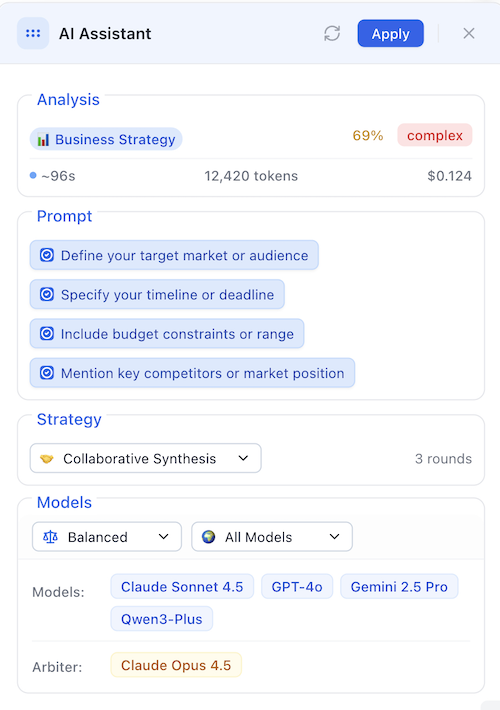
Analysis Results:
- Category: Business Strategy — 69% confidence
- Complexity: Complex
- Assistant Suggestions:
- Who is your target audience?
- What's your timeline?
- What's your budget range?
Strategy Recommendation:
- Primary: Collaborative Synthesis
- Reason: Business decisions benefit from synthesized perspectives that combine strategic insights from multiple viewpoints.
- Rounds: 3 (recommended for Complex)
- Cost: $0.27 | ~45s
Models: Gemini 2.5 Flash, GPT-4o, Claude Sonnet 4.5 Arbiter: Claude Opus 4.5
Refining Your Approach
You check the suggestions and decide to add more context:
Assistant Suggestions:
- Who is your target audience?
- What's your timeline?
- What's your budget range?
Improved Prompt:
Create a **B2B** SaaS GTM strategy for a **Series A startup targeting mid-market European fintech companies**.

The strategy should include a **6-month roadmap**, **budget allocation for a $50k marketing spend**, and key performance indicators.

Focus on content marketing and partnership channels.
Why this is better: The improved prompt directly answers the assistant's clarification questions, transforming a generic request into a fully specified strategic brief. This allows the Collaborative Synthesis strategy to:
- Use the Timeline to structure the project phases
- Use the Budget to constrain recommendations to realistic options
- Use the Target Audience to tailor the tone and channel selection
[!NOTE] Still seeing suggestions? The assistant is designed to push for perfection. Even with a great prompt, it might suggest adding a polite closing ("please") or specifying the exact output format (e.g., "Report", "Table") to ensure the best possible result.
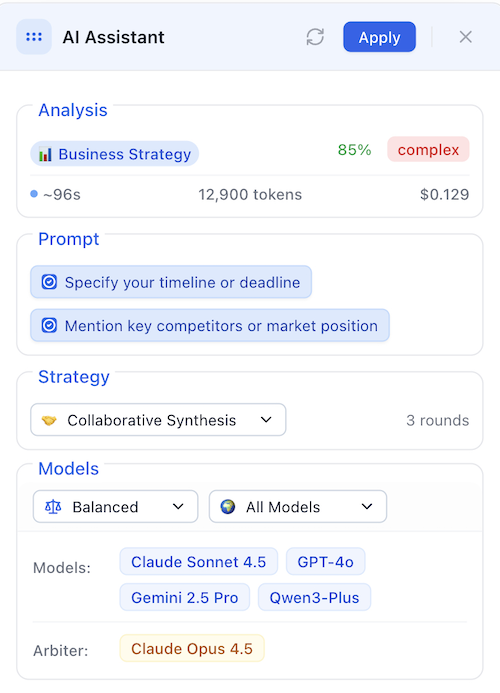
The assistant updates recommendations based on your enhanced prompt, potentially suggesting more rounds or different models for the added complexity.
Applying the Configuration
Click Apply in the header. The assistant:
- Populates your prompt in the dashboard
- Sets Collaborative Synthesis strategy
- Selects all recommended models
- Configures 3 rounds
- Assigns Claude Opus as arbiter
- Closes the toolbox
You're ready to run your ensemble query!
Configuration Options Explained
Strategy Alternatives
Every recommendation includes 2-3 alternative strategies. Click the strategy dropdown to view:
- Current strategy (highlighted with checkmark)
- Alternative 1 with reason and trade-off
- Alternative 2 with reason and trade-off
Example dropdown:
✓ Collaborative Synthesis
synthesis of diverse perspectives
Trade-off: Fast but may miss edge cases

Expert Panel
Maximum diversity of viewpoints
Trade-off: Higher cost, longer runtime

Debate Tournament
Best for structured argument analysis
Trade-off: Takes longer but provides balanced perspectives
Click any alternative to instantly switch strategies. The models, rounds, and cost estimates update automatically.
[!TIP] Why didn't the strategy change? Adding context (like the "Refining Your Approach" step above) strengthens the Category match but rarely changes it. Since Strategy is derived from Category, making a Business prompt more detailed just confirms it's a Business prompt, keeping the strategy consistent. This particular "stickiness" ensures stable workflows.
Optimization Priorities
The priority selector dramatically changes model recommendations:
Speed Priority
Goal: Results in under 30 seconds Typical models: Gemini Flash, GPT-4o Mini, Claude Haiku Cost range: $0.02 - $0.06 Best for: Quick tasks, iterations, brainstorming, simple queries
Cost Priority
Goal: Minimize token cost while maintaining quality Typical models: Mix of efficient mid-tier models Cost range: $0.05 - $0.10 Best for: High-volume usage, budget constraints, moderate complexity
Quality Priority
Goal: Best possible results regardless of cost Typical models: Claude Opus, GPT-4o, Gemini Pro, DeepSeek Reasoner Cost range: $0.15 - $0.40 Best for: Important decisions, complex analysis, creative projects
Balanced Priority (Default)
Goal: Optimal mix of speed, cost, and quality Typical models: Claude Sonnet, GPT-4o, Gemini Pro, DeepSeek Chat Cost range: $0.08 - $0.18 Best for: Most use cases, good default choice
Region Preferences
Control which models are included based on geographic origin:
Global (Default)
Includes: All available models Benefit: Maximum diversity of perspectives and capabilities Example set: Claude Sonnet, GPT-4o, DeepSeek, Qwen, Gemini Pro
US/European Only
Includes: Anthropic (Claude), OpenAI (GPT), Google (Gemini) Benefit: Western perspectives, US data residency Example set: Claude Sonnet, GPT-4o, Gemini Pro Use when: Regulatory requirements, data sensitivity, cultural context
Chinese Only
Includes: DeepSeek, Qwen, other Chinese providers Benefit: Chinese perspectives, often more cost-effective Example set: DeepSeek Chat, DeepSeek Reasoner, Qwen-Max, Qwen-Plus Use when: Asia market focus, Chinese language, budget optimization
Strategic Mix
Includes: Top models from each major region/provider Benefit: Balanced perspective and risk mitigation Example set: 1x OpenAI, 1x Anthropic, 1x Google, 1x DeepSeek
Tips & Best Practices
Write Clearer Initial Prompts
Even rough prompts help, but clarity improves recommendations. Specific prompts get higher confidence classifications and better-matched strategies.
Use the Suggestions
When the assistant offers enhancement suggestions:
- Read all suggestions before dismissing—they're tailored to your prompt
- Apply relevant ones by checking the boxes—they refine your prompt automatically
- Ignore non-applicable ones—not every suggestion fits every situation
Experiment with Priorities
Don't default to "Balanced" for everything. The cost difference between Speed and Quality can be 5-8x, so choose appropriately for your needs.
Trust the Complexity Assessment
The complexity indicator guides round counts:
- Simple: 1-2 rounds usually sufficient
- Moderate: 2-3 rounds recommended
- Complex: 3-4 rounds for thorough analysis. Note: Even short prompts can be "Complex" if they use dense expert terminology or specific structural formatting.
- Expert: 4+ rounds, consider Quality priority
More rounds = higher cost but better results for complex tasks.